# Introduction to rpk
> For the complete documentation index, see [llms.txt](https://docs.redpanda.com/llms.txt). Component-specific: [streaming-full.txt](https://docs.redpanda.com/streaming-full.txt)
---
title: Introduction to rpk
latest-operator-version: v26.1.4
# EOL = End-of-Life (support lifecycle status)
page-is-nearing-eol: "false"
page-is-past-eol: "true"
page-eol-date: December 22, 2024
latest-console-tag: v3.7.3
latest-connect-version: 4.93.0
docname: intro-to-rpk
page-component-name: streaming
page-version: "23.3"
page-component-version: "23.3"
page-component-title: Streaming
page-relative-src-path: intro-to-rpk.adoc
page-edit-url: https://github.com/redpanda-data/docs/edit/v/23.3/modules/get-started/pages/intro-to-rpk.adoc
description: Learn about rpk and how to use it to interact with your Redpanda cluster.
page-git-created-date: "2023-07-24"
page-git-modified-date: "2026-05-26"
support-status: past end-of-life
---
The `rpk` command line interface tool is designed to manage your entire Redpanda cluster, without the need to run a separate script for each function, as with Apache Kafka. The `rpk` commands handle everything from configuring brokers and low-level tuning, to high-level general Redpanda tasks. For example, you can use `rpk` to perform rolling upgrades and tuning, monitor your cluster’s health, and implement access control lists (ACLs) and other security features. You can also use `rpk` to perform basic streaming tasks, such as creating topics, producing to topics, and consuming from topics.
In general, `rpk` commands can be divided into these categories:
- Managing Redpanda
- Managing topics, producing to topics, and consuming from topics
- Debugging and tuning the host
- Interacting with Redpanda Cloud
## [](#installation-methods)Installation methods
The `rpk` binary is bundled with Redpanda, so it is automatically installed on each Redpanda broker. In addition, you can install `rpk` on your local machine as a [standalone binary](https://docs.redpanda.com/streaming/23.3/get-started/rpk-install/). This method can be used for self-hosted and cloud deployments, as well as Kubernetes deployments.
After you install `rpk`, you can use it to interact with a Redpanda cluster. The cluster can run on your local machine, or it can run externally on a remote server or on [Redpanda Cloud](https://docs.redpanda.com/cloud-data-platform/get-started/cluster-types/), for example.
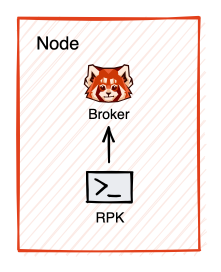
The following diagram shows how `rpk` communicates with a Redpanda broker installed on your local machine. The `rpk` binary is installed as part of the Redpanda bundle.
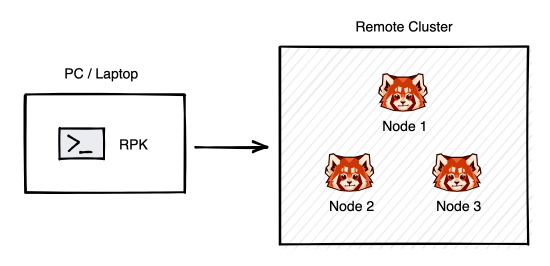
The next diagram shows how `rpk` communicates with a remote cluster when you install `rpk` as a standalone binary on your local machine.
## [](#specifying-command-properties)Specifying command properties
You can specify `rpk` command properties in the following ways:
- By specifying the appropriate flag on the command line.
- By defining the corresponding environment variables.
Environment variable settings only last for the duration of a shell session.
- By editing the configuration file settings in the `rpk` section of the `redpanda.yaml` file.
Configuration file property settings stay the same for each shell session.
- By editing the configuration file settings in the `rpk.yaml` file.
Configuration file property settings stay the same for each shell session.
Command line flag settings take precedence over the corresponding environment variables, and environment variables take precedence over configuration file settings. If a required flag is not specified on the command line, Redpanda searches the environment variable. If the environment variable is not set, the value in the `rpk.yaml` configuration file is used, if that file is available, otherwise the value in the `redpanda.yaml` configuration file is used.
> 💡 **TIP**
>
> If you specify `rpk` command properties in the configuration files or as environment variables, you don’t need to specify them again on the command line.
## [](#common-configuration-properties)Common configuration properties
Every `rpk` command supports a set of common configuration properties. You can set one or more options in an `rpk` command by using the `-X` flag:
```bash
rpk -X -X
```
Get a list of available options with `-X list`:
```bash
rpk -X list
```
Or, get a detailed description about each option with `-X help`:
```bash
rpk -X help
```
Some of the common configuration properties apply across all rpk commands as defaults. These default properties have keys with names starting with `defaults`, and they’re viewable in `rpk -X list` and `rpk -X help`. For more details, see [`rpk -X options`](https://docs.redpanda.com/streaming/23.3/reference/rpk/rpk-x-options/).
Configuration flags deprecated by -X options
Prior to `rpk` supporting the `-X` flag, each common configuration option was itself a configurable flag. Those flags are deprecated in this version of `rpk`.
The following table lists the deprecated flags and their corresponding properties, environment variables, and configuration file settings.
| Property | Deprecated Flag | Deprecated Configuration File Field | Supported -X Flag |
| --- | --- | --- | --- |
| Redpanda Brokers | --brokers | rpk.kafka_api.brokers | brokers |
| Admin API | --api-urls | rpk.admin_api.addresses | admin.hosts |
| Redpanda TLS Key | --tls-key | rpk.kafka_api.tls.key_file | tls.key |
| Redpanda TLS Cert | --tls-cert | rpk.kafka_api.tls.cert_file | tls.cert |
| Redpanda TLS Truststore | --tls-truststore | rpk.kafka_api.tls.truststore_file | tls.ca |
| Redpanda SASL Mechanism | --sasl-mechanism | rpk.kafka_api.sasl.type | sasl.mechanism |
| Redpanda SASL Username | --user | rpk.kafka_api.sasl.user | user |
| Redpanda SASL Password | --password | rpk.kafka_api.sasl.password | pass |
| Redpanda Admin API TLS Key | --admin-api-tls-key | rpk.admin_api.tls.key_file | admin.tls.key |
| Redpanda Admin API TLS Cert | --admin-api-tls-cert | rpk.admin_api.tls.cert_file | admin.tls.cert |
| Redpanda Admin API TLS Truststore | --admin-api-tls-truststore | rpk.admin_api.tls.truststore_file | admin.tls.ca |
## [](#next-steps)Next steps
- Learn how to [configure `rpk` profiles](https://docs.redpanda.com/streaming/23.3/get-started/config-rpk-profile/).
- Learn more about setting [broker and admin API addresses](https://docs.redpanda.com/streaming/23.3/get-started/broker-admin/).
- Use [`rpk generate app`](https://docs.redpanda.com/streaming/23.3/reference/rpk/rpk-generate/rpk-generate-app/) to generate a sample application to connect with Redpanda.
- See the [rpk documentation](https://docs.redpanda.com/streaming/23.3/reference/rpk/) for a list of all `rpk` commands and their syntax.