Set Up MySQL CDC with Debezium and Redpanda
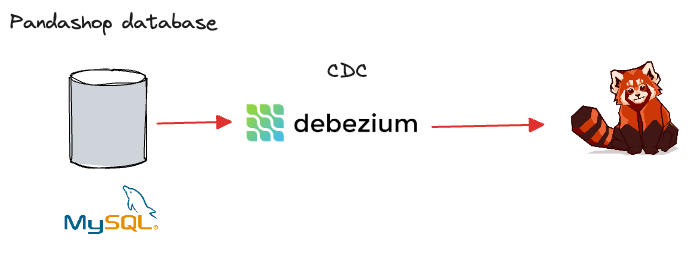
This example demonstrates how to use Debezium to capture the changes made to MySQL in real time and stream them to Redpanda.
This ready-to-run Docker Compose setup contains the following containers:
-
mysqlcontainer with thepandashopdatabase, containing a single table,orders -
debeziumcontainer capturing changes made to theorderstable in real time. -
redpandacontainer to ingest change data streams produced bydebezium
For more information about the pandashop database schema, see the /data/mysql_bootstrap.sql file.
Prerequisites
You must have Docker and Docker Compose installed on your host machine.
This lab is intended for Linux and macOS users. If you are using Windows, you must use the Windows Subsystem for Linux (WSL) to run the commands in this lab.
Run the lab
-
Clone this repository:
git clone https://github.com/redpanda-data/redpanda-labs.git -
Change into the
docker-compose/cdc/mysql-json/directory:cd redpanda-labs/docker-compose/cdc/mysql-json -
Set the
REDPANDA_VERSIONenvironment variable to the version of Redpanda that you want to run. For all available versions, see the GitHub releases.For example:
export REDPANDA_VERSION=v26.2.6 -
Run the following in the directory where you saved the Docker Compose file:
docker compose up -dWhen the
mysqlcontainer starts, the/data/mysql_bootstrap.sqlfile creates thepandashopdatabase and theorderstable, followed by seeding the ` orders` table with a few records. -
Log into MySQL:
docker compose exec mysql mysql -u mysqluser -pProvide
mysqlpwas the password when prompted. -
Check the content inside the
orderstable:use pandashop; show tables; select * from orders;This is your source table.
-
Exit MySQL:
exit -
While Debezium is up and running, create a source connector configuration to extract change data feeds from MySQL.
docker compose exec debezium curl -i -X POST -H "Accept:application/json" -H "Content-Type:application/json" localhost:8083/connectors/ -d '
 {
  "name": "mysql-connector",
  "config": {
    "connector.class": "io.debezium.connector.mysql.MySqlConnector",
    "tasks.max": "1",
    "database.hostname": "mysql",
    "database.port": "3306",
    "database.user": "debezium",
    "database.password": "dbz",
    "database.server.id": "184054",
    "topic.prefix": "dbz",
    "database.include.list": "pandashop",
    "schema.history.internal.kafka.bootstrap.servers": "redpanda:9092",
    "schema.history.internal.kafka.topic": "schemahistory.pandashop"
  }
}'
You should see the following in the output:
HTTP/1.1 201 Created
Date: Mon, 12 Feb 2024 16:37:09 GMT
Location: http://localhost:8083/connectors/mysql-connector
Content-Type: application/json
Content-Length: 489
Server: Jetty(9.4.51.v20230217)
The
database.*configurations specify the connectivity details tomysqlcontainer. The parameter,schema.history.internal.kafka.bootstrap.serverspoints to theredpandabroker the connector uses to write and recover DDL statements to the database schema history topic. -
Wait a minute or two until the connector gets deployed inside Debezium and creates the initial snapshot of change log topics in Redpanda.
-
Check the list of change log topics in
redpandaby running:docker compose exec redpanda rpk topic listThe output should contain two topics with the prefix
dbz.*specified in the connector configuration. The topicdbz.pandashop.ordersholds the initial snapshot of change log events streamed fromorderstable.NAME PARTITIONS REPLICAS connect-status 5 1 connect_configs 1 1 connect_offsets 25 1 dbz 1 1 dbz.pandashop.orders 1 1 schemahistory.pandashop 1 1
-
Monitor for change events by consuming the
dbz.pandashop.orderstopic:docker compose exec redpanda rpk topic consume dbz.pandashop.orders -
While the consumer is running, open another terminal to insert a record to the
orderstable.export REDPANDA_VERSION=v26.2.6 docker compose exec mysql mysql -u mysqluser -pProvide
mysqlpwas the password when prompted. -
Insert the following record:
use pandashop;
INSERT INTO orders (customer_id, total) values (5, 500);
This will trigger a change event in Debezium, immediately publishing it to dbz.pandashop.orders Redpanda topic, causing the consumer to display a new event in the console. That proves the end-to-end functionality of your CDC pipeline.
Clean up
To shut down and delete the containers along with all your cluster data:
docker compose down -vNext steps
Now that you have change log events ingested into Redpanda. You process change log events to enable use cases such as:
-
Database replication
-
Stream processing applications
-
Streaming ETL pipelines
-
Update caches
-
Event-driven Microservices
