About Iceberg Topics
The Apache Iceberg integration for Redpanda allows you to store topic data in the cloud in the Iceberg open table format. This makes your streaming data immediately available in downstream analytical systems, including data warehouses like Snowflake, Databricks, ClickHouse, and Redshift, without setting up and maintaining additional ETL pipelines. You can also integrate your data directly into commonly-used big data processing frameworks, such as Apache Spark and Flink, standardizing and simplifying the consumption of streams as tables in a wide variety of data analytics pipelines.
Redpanda supports version 2 of the Iceberg table format.
Iceberg concepts
Apache Iceberg is an open source format specification for defining structured tables in a data lake. The table format lets you quickly and easily manage, query, and process huge amounts of structured and unstructured data. This is similar to the way you would manage and run SQL queries against relational data in a database or data warehouse. The open format lets you use many different languages, tools, and applications to process the same data in a consistent way, so you can avoid vendor lock-in. This data management system is also known as a data lakehouse.
In the Iceberg specification, tables consist of the following layers:
-
Data layer: Stores the data in data files. The Iceberg integration currently supports the Parquet file format. Parquet files are column-based and suitable for analytical workloads at scale. They come with compression capabilities that optimize files for object storage.
-
Metadata layer: Stores table metadata separately from data files. The metadata layer allows multiple writers to stage metadata changes and apply updates atomically. It also supports database snapshots, and time travel queries that query the database at a previous point in time.
-
Manifest files: Track data files and contain metadata about these files, such as record count, partition membership, and file paths.
-
Manifest list: Tracks all the manifest files belonging to a table, including file paths and upper and lower bounds for partition fields.
-
Metadata file: Stores metadata about the table, including its schema, partition information, and snapshots. Whenever a change is made to the table, a new metadata file is created and becomes the latest version of the metadata in the catalog.
For Iceberg-enabled topics, the manifest files are in JSON format.
-
-
Catalog: Contains the current metadata pointer for the table. Clients reading and writing data to the table see the same version of the current state of the table. The Iceberg integration supports two catalog integration types. You can configure Redpanda to catalog files stored in the same object storage bucket or container where the Iceberg data files are located, or you can configure Redpanda to use an Iceberg REST catalog endpoint to update an externally-managed catalog when there are changes to the Iceberg data and metadata.
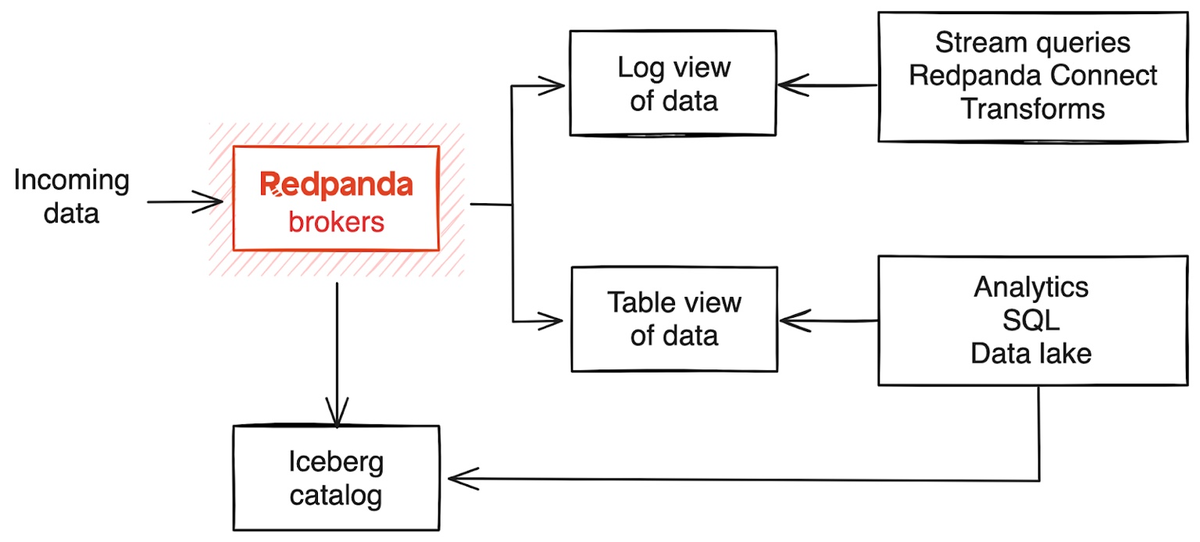
When you enable the Iceberg integration for a Redpanda topic, Redpanda brokers store streaming data in the Iceberg-compatible format in Parquet files in object storage, in addition to the log segments uploaded using Tiered Storage. Storing the streaming data in Iceberg tables in the cloud allows you to derive real-time insights through many compatible data lakehouse, data engineering, and business intelligence tools.
Prerequisites
To enable Iceberg for Redpanda topics, you must have the following:
-
A running BYOC or BYOVPC cluster on Redpanda version 25.1 or later. The Iceberg integration is supported only for BYOC and BYOVPC, and the cluster properties to configure Iceberg are available with v25.1.
-
rpk: See Install or Update rpk.
-
Familiarity with the Redpanda Cloud API. You must authenticate to the Cloud API and use the Control Plane API to update your cluster configuration.
Limitations
-
It is not possible to append topic data to an existing Iceberg table that is not created by Redpanda.
-
If you enable the Iceberg integration on an existing Redpanda topic, Redpanda does not backfill the generated Iceberg table with topic data.
-
JSON schemas are supported starting with Redpanda version 25.2.
Enable Iceberg integration
To create an Iceberg table for a Redpanda topic, you must set the cluster configuration property iceberg_enabled to true, and also configure the topic property redpanda.iceberg.mode. You can choose to provide a schema if you need the Iceberg table to be structured with defined columns.
-
Set the
iceberg_enabledconfiguration option on your cluster totrue.When multiple clusters write to the same catalog, each cluster must use a distinct namespace to avoid table name collisions. This is especially critical for REST catalog providers that offer a single global catalog per account (such as AWS Glue), where there is no other isolation mechanism. By default, Redpanda creates Iceberg tables in a namespace called
redpanda. To use a unique namespace for your cluster’s REST catalog integration, also seticeberg_default_catalog_namespacewhen you seticeberg_enabled. You cannot change this property after you enable Iceberg topics on the cluster.-
rpk
-
Cloud API
rpk cloud login
rpk profile create  --from-cloud <cluster-id>
rpk cluster config set iceberg_enabled true
# Optional: set a custom namespace (default is "redpanda")
# rpk cluster config set iceberg_default_catalog_namespace '["<custom-namespace>"]'
# Store your cluster ID in a variable export RP_CLUSTER_ID=<cluster-id> # Retrieve a Redpanda Cloud access token export RP_CLOUD_TOKEN=`curl -X POST "https://auth.prd.cloud.redpanda.com/oauth/token" \ -H "content-type: application/x-www-form-urlencoded" \ -d "grant_type=client_credentials" \ -d "client_id=<client-id>" \ -d "client_secret=<client-secret>"` # Update cluster configuration to enable Iceberg topics # Optional: to set a custom namespace (default is "redpanda"), # add "iceberg_default_catalog_namespace":["<custom-namespace>"] to custom_properties curl -H "Authorization: Bearer ${RP_CLOUD_TOKEN}" -X PATCH \ "https://api.cloud.redpanda.com/v1/clusters/${RP_CLUSTER_ID}" \ -H 'accept: application/json'\ -H 'content-type: application/json' \ -d '{"cluster_configuration":{"custom_properties": {"iceberg_enabled":true}}}'The
PATCH /clusters/{cluster.id}request returns the ID of a long-running operation. The operation may take up to ten minutes to complete. You can check the status of the operation by polling theGET /operations/{id}endpoint. -
-
(Optional) Create a new topic.
rpk topic create <new-topic-name>TOPIC STATUS <new-topic-name> OK -
Configure
redpanda.iceberg.modefor the topic. You can choose one of the following Iceberg modes:-
key_value: Creates an Iceberg table using a simple schema, consisting of two columns, one for the record metadata including the key, and another binary column for the record’s value. -
value_schema_id_prefix: Creates an Iceberg table whose structure matches the Redpanda schema for this topic, with columns corresponding to each field. You must register a schema in the Schema Registry (see next step), and producers must write to the topic using the Schema Registry wire format. -
value_schema_latest: Creates an Iceberg table whose structure matches the latest schema registered for the subject in the Schema Registry. -
disabled(default): Disables writing to an Iceberg table for this topic.
rpk topic alter-config <new-topic-name> --set redpanda.iceberg.mode=<topic-iceberg-mode>TOPIC STATUS <new-topic-name> OK -
-
Register a schema for the topic. This step is required for the
value_schema_id_prefixandvalue_schema_latestmodes.rpk registry schema create <subject-name> --schema </path-to-schema> --type <format>SUBJECT VERSION ID TYPE <subject-name> 1 1 PROTOBUF
Access Iceberg data
To query the Iceberg table, you need access to the object storage bucket or container where the Iceberg data is stored.
For BYOC clusters, the bucket name and table location are as follows:
| Cloud provider | Bucket or container name | Iceberg table location |
|---|---|---|
AWS |
|
|
Azure |
The Redpanda cluster ID is also used as the container name (ID) and the storage account ID. |
|
GCP |
|
For BYOVPC clusters, the bucket name is the name you chose when you created the object storage bucket as a customer-managed resource.
For Azure clusters, you must add the public IP addresses or ranges from the REST catalog service, or other clients requiring access to the Iceberg data, to your cluster’s allow list. Alternatively, add subnet IDs to the allow list if the requests originate from the same Azure region.
For example, to add subnet IDs to the allow list through the Control Plane API PATCH /v1/clusters/<cluster-id> endpoint, run:
curl -X PATCH https://api.cloud.redpanda.com/v1/clusters/<cluster-id> \
  -H "Content-Type: application/json" \
  -H "Authorization: Bearer ${RP_CLOUD_TOKEN}" \
  -d @- << EOF
{
  "cloud_storage": {
    "azure": {
      "allowed_subnet_ids": [
         <list-of-subnet-ids>
      ]
    }
  }
}
EOF
As you produce records to the topic, the data also becomes available in object storage for Iceberg-compatible clients to consume. You can use the same analytical tools to read the Iceberg topic data in a data lake as you would for a relational database.
See also: Schema types translation.
Iceberg data retention
Data in an Iceberg-enabled topic is consumable from Kafka based on the configured topic retention policy. Conversely, data written to Iceberg remains queryable as Iceberg tables indefinitely. The Iceberg table persists unless you:
-
Delete the Redpanda topic associated with the Iceberg table. This is the default behavior set by the
iceberg_deletecluster property and theredpanda.iceberg.deletetopic property. If you set this property tofalse, the Iceberg table remains even after you delete the topic. -
Explicitly delete data from the Iceberg table using a query engine.
-
Disable the Iceberg integration for the topic and delete the Parquet files in object storage.
The DLQ table (<topic-name>~dlq) follows the same persistence rules as the main Iceberg table.
Schema evolution
Redpanda supports schema evolution in accordance with the Iceberg specification. Permitted schema evolutions include reordering fields and promoting field types. When you update the schema in Schema Registry, Redpanda automatically updates the Iceberg table schema to match the new schema.
For example, if you produce records to a topic demo-topic with the following Avro schema:
{
  "type": "record",
  "name": "ClickEvent",
  "fields": [
    {
      "name": "user_id",
      "type": "int"
    },
    {
      "name": "event_type",
      "type": "string"
    }
  ]
}
rpk registry schema create demo-topic-value --schema schema_1.avsc
echo '{"user_id":23, "event_type":"BUTTON_CLICK"}' | rpk topic produce demo-topic --format='%v\n' --schema-id=topicThen, you update the schema to add a new field ts, and produce records with the updated schema:
{
  "type": "record",
  "name": "ClickEvent",
  "fields": [
    {
      "name": "user_id",
      "type": "int"
    },
    {
      "name": "event_type",
      "type": "string"
    },
    {
      "name": "ts",
      "type": [
          "null",
          { "type": "long", "logicalType": "timestamp-millis" }
        ],
      "default": null  # Default value for the new field
    }
  ]
}
The ts field can be either null or a long representing epoch milliseconds. The default value is null.
rpk registry schema create demo-topic-value --schema schema_2.avsc

echo '{"user_id":858, "event_type":"BUTTON_CLICK", "ts":1737998723230}' | rpk topic produce demo-topic --format='%v\n' --schema-id=topic
Querying the Iceberg table for demo-topic includes the new column ts:
+---------+--------------+--------------------------+
| user_id | event_type   | ts                       |
+---------+--------------+--------------------------+
| 858     | BUTTON_CLICK | 2025-02-26T20:05:23.230Z |
| 23      | BUTTON_CLICK | NULL                     |
+---------+--------------+--------------------------+