Register a Self-Managed MCP Server
Register your existing MCP server with Redpanda to add authentication and observability without changing your server’s code. This guide covers the self-managed path from Create an MCP Server in depth. Choose this when you already run a server and want Redpanda to proxy it.
After completing this guide, you will be able to:
-
Register a self-managed MCP server in Agentic Data Plane
-
Pick the right transport (SSE vs. Streamable HTTP) and authentication mode
-
Confirm tool discovery completed and the server is reachable through its proxy URL
When to use this
Choose self-managed registration when:
-
The MCP server is already deployed in your environment and you don’t want to migrate it to a managed type.
-
You need custom tool logic that no managed type provides.
-
You want a Redpanda-managed URL for each server, with Inspector, observability, and agent access, without standing up your own gateway.
If you don’t already run a server, use a managed type. See Managed catalog.
Prerequisites
-
An MCP server reachable from the AI Gateway. The AI Gateway doesn’t connect to loopback, cloud metadata, link-local, multicast, IPv6 unique local, or unspecified addresses, or to your environment’s own VPC, pod, and service address ranges, except cluster-local services your environment has been enabled to reach.
-
The endpoint URL.
http://is allowed except with user-delegated OAuth and service-account OAuth, which requirehttps://. User-delegated OAuth has one exception, for cluster-local servers (see Troubleshooting). -
Knowledge of which transport the server speaks (SSE or Streamable HTTP). If you don’t know, see Transport choice.
-
If using static-key or service-account-OAuth: secrets pre-created in the Redpanda Agentic Data Plane secret store,
UPPER_SNAKE_CASE. -
If using user-delegated OAuth with automatic setup: nothing, when the server accepts a client metadata document or supports dynamic client registration. If it supports neither, register an OAuth app with the upstream vendor and have its client ID ready, plus a client-secret reference in the secret store for a confidential app.
-
If attaching an OAuth provider your organization already manages instead: the provider registered first. See User-delegated OAuth.
Create the server
-
Open MCP servers in the sidebar and click Add MCP server.
-
In the marketplace picker, click Remote (Proxied).
-
In the Identity section, replace the suggested
Nameand optionally add aDescription. The constraints are the same as in Create an MCP Server. -
In the Connection section, enter the
Server URLand pick theTransport. -
Configure authentication (see Authentication).
-
Click Create server.
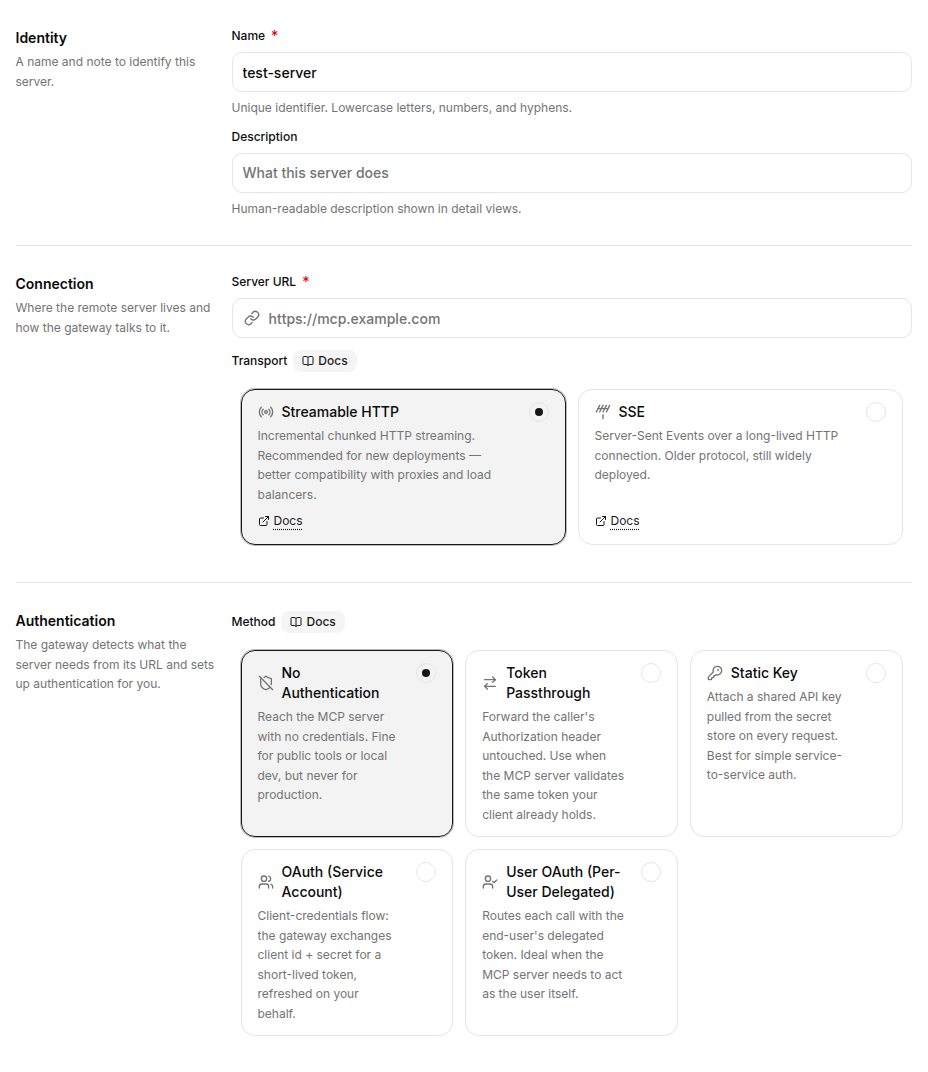
Transport choice
Two transports are available:
-
Streamable HTTP: The current MCP transport, recommended for new servers.
-
SSE: Server-sent events. The older MCP transport, still widely deployed.
Pick whichever your server actually speaks. To probe a server quickly:
# SSE handshake: expect a stream of `event:` lines on success.
curl -N -H "Accept: text/event-stream" https://your-server.example.com/mcp/sse

# Streamable HTTP: expect a JSON-RPC response (JSON or an SSE stream) on success.
curl -X POST -H "Content-Type: application/json" \
  -H "Accept: application/json, text/event-stream" \
  -d '{"jsonrpc":"2.0","id":1,"method":"initialize","params":{"protocolVersion":"2025-06-18","capabilities":{},"clientInfo":{"name":"probe","version":"1.0"}}}' \
  https://your-server.example.com/mcp
Authentication
The authentication modes from Create an MCP Server all apply. Several patterns are particularly common for self-managed servers:
| Pattern | Use when |
|---|---|
Static key with a custom header |
First-party servers that authenticate with a non- |
Service-account OAuth |
The upstream system supports OAuth client credentials and you want one shared identity for all callers. The server URL must use |
Token passthrough |
The upstream server already validates client tokens. Redpanda forwards the caller’s |
For user-delegated OAuth, the URL must be https://, unless it addresses a server inside your own cluster and cluster-local addressing has been enabled for your environment. Redpanda can set up OAuth automatically for the server, or you can attach an OAuth provider you already registered. See User-delegated OAuth.
Tool discovery
After create, Redpanda runs a live tools/list against the server and shows the result on the detail page’s Overview tab. The Inspector tab (see Test a server’s tools) exercises individual tools.
If the tools list is empty or stale, open the Inspector tab, click Session details, and then click Refresh to re-run discovery against the server.
Connection errors and retry
| Error | What it means |
|---|---|
|
The user-delegated authentication path has no stored connection for the calling user. The failed tool result carries the authorization URL so the user can complete the consent flow, then call the tool again. See User-delegated OAuth. |
|
The user’s stored token has expired and refresh failed. Have the user reconnect. |
Plain connection error / 502 / 504 |
Redpanda couldn’t reach your server. The Overview tab and the Inspector tools list show the upstream error. |
Troubleshooting
| Symptom | What to check |
|---|---|
"Transport mismatch" or empty stream |
Your server speaks the other transport. Re-probe with curl per Transport choice and update the |
TLS errors when registering an |
Confirm the server’s certificate chains to a public CA. Self-signed certs aren’t supported. |
|
Authentication is misconfigured. For static-key or service-account OAuth, verify the secret content and the |
Tool schema parse errors |
The server returned a |
The URL is refused for targeting a cluster-local host |
A URL whose host ends in |
