Agentic Data Plane

Set Up a Self-Managed Agent

A self-managed agent is an agent you build and run yourself, registered with Redpanda ADP as an identity. You keep your runtime, framework, and hosting; ADP gives the agent a service account and a client credential, and the AI Gateway becomes the agent’s LLM and MCP endpoint. Because every model call and tool call flows through the gateway, ADP attributes spend, tokens, latency, and traces back to the agent and reconstructs each session as a transcript. ADP does not host or run your agent.

After reading this page, you will be able to:

  • Choose a self-managed agent over a managed agent for your use case

  • Register a self-managed agent and issue it an OAuth client credential

  • Route an agent’s LLM and MCP calls through the AI Gateway and group them into transcripts

Self-managed compared to managed agents

The two agent types differ in who runs the agent and how it is defined. They coexist in the same registry, the same governance views, and the same cost-attribution queries.

Question Self-managed Managed

Who runs the agent?

You do. ADP registers the agent and proxies its LLM and tool calls, but the runtime is yours.

Redpanda deploys, runs, and observes the agent for you.

How is the agent defined?

It is already coded in your own framework, for example, LangChain, CrewAI, or a custom runtime.

You configure it declaratively through the create form, with no runtime code to maintain.

What connects it to ADP?

A client credential the agent exchanges for a gateway token. Your code points its LLM and MCP clients at the gateway.

The managed runtime wires the gateway for you.

For the declarative path, see Create an agent.

Prerequisites

  • The dataplane_adp_agent_create permission, granted by the Writer built-in role. See Agent management permissions.

  • At least one LLM provider configured in ADP. The agent calls the model through this provider.

  • If the agent calls tools: One or more MCP servers registered in ADP.

  • An agent built in your own framework. The Setup tab generates ready-to-paste samples for ai-sdk-go, LangChain, CrewAI, ADK Java, and ADK Go.

Register the agent

  1. Open Agents in the sidebar.

  2. Click Create agent.

  3. Click I host it myself, so ADP registers the agent as an identity and leaves the runtime to you.
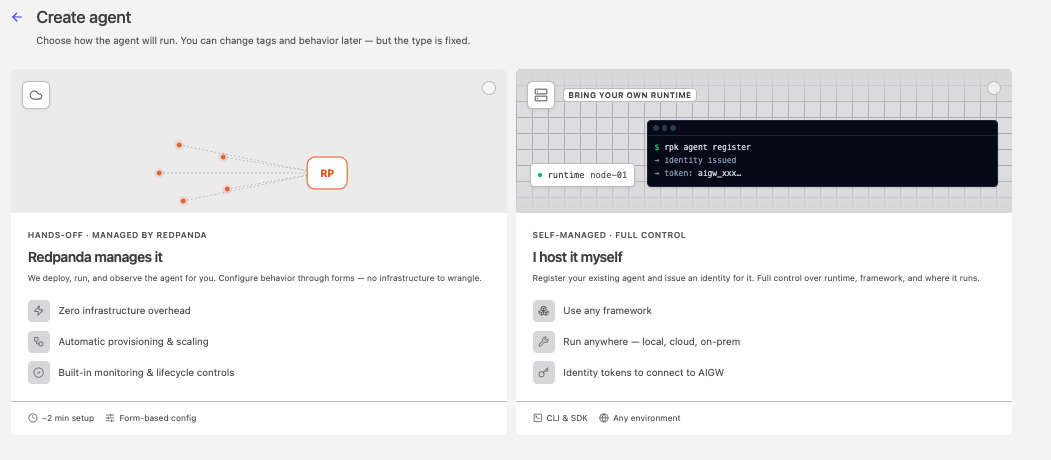
    The runtime choice in the create-agent flow
  4. Fill in the identity fields, then click Create agent:

    • Agent ID: Required. Lowercase letters, numbers, and hyphens, up to 63 characters. Used in URLs, in cost-attribution queries, and as the agent’s resource identifier. Immutable after creation.

    • Display name: Human-readable name shown in the agent list and detail header.

    • Description: Optional. Up to 1024 characters.

    • Tags: Optional key/value pairs to organize and filter agents.

The agent opens on its detail page with a Self-managed type badge. A self-managed agent carries no provider, model, or tool configuration of its own: it is an identity that calls the organization’s shared gateway resources.

Issue a client secret

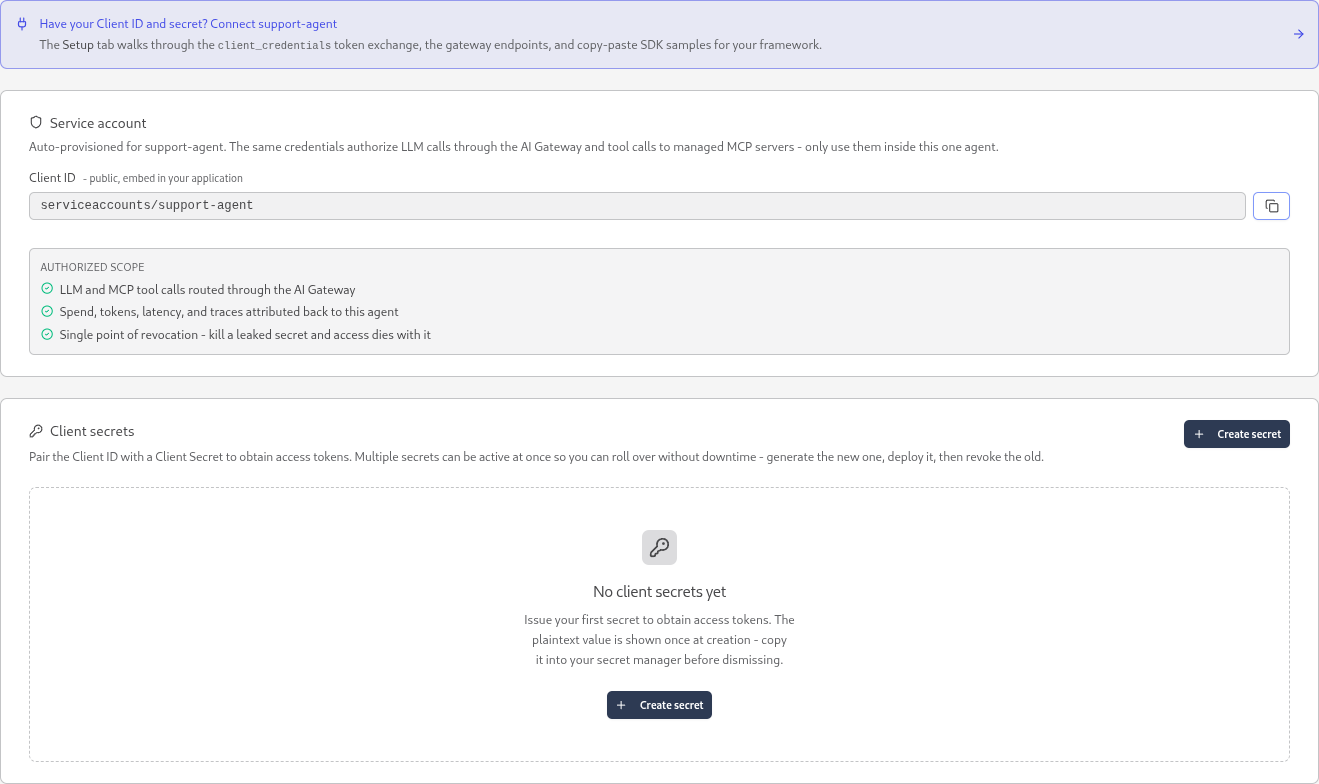
ADP provisions a service account for the agent at registration. To authenticate the agent’s calls, issue an OAuth 2.0 client secret on the agent’s Credentials tab.

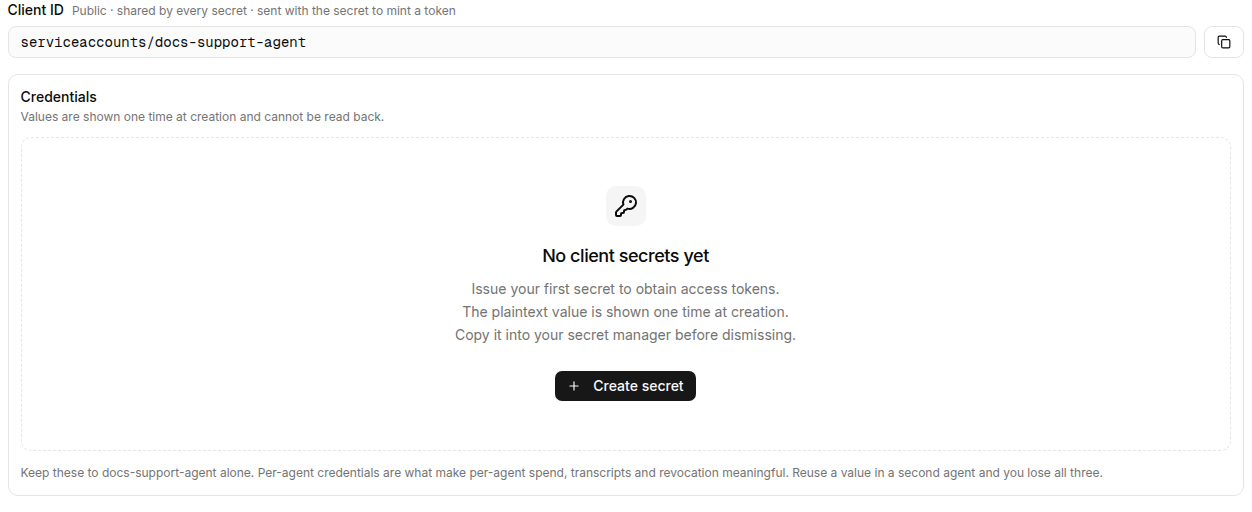
  1. Open the agent’s Credentials tab.

    The Credentials tab for a self-managed agent
  2. Note the Client ID. It has the form serviceaccounts/<agent-id>, where <agent-id> is the agent’s identifier. The Client ID is public and stable: every secret on the agent shares it.

  3. Click Create secret.

  4. Optionally enter a Label to identify the secret in the list and in audit logs, for example, production.

  5. Click Generate secret.

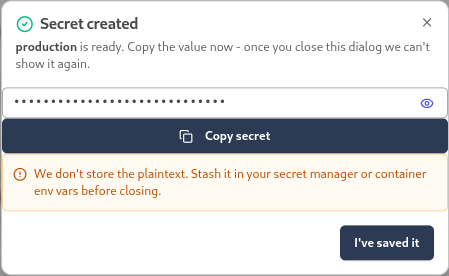
    ADP shows the plaintext Client secret one time.

    The Secret created dialog showing a masked client secret
  6. Copy the secret into your secret manager or container environment variables, then click I’ve saved it.

The client secret is shown only at creation. ADP stores a hash and cannot show the plaintext again. Each secret expires 90 days after creation. To rotate without downtime, create a new secret, deploy it, and then revoke the old one with Revoke on its row in the secrets list.

Connect your agent to the AI Gateway

The agent’s Setup tab generates everything your code needs: the gateway endpoints, an environment-variable block, and a copy-paste SDK sample for your framework. Open the Setup tab, then wire three things.

The Setup tab listing the three steps to integrate a self-managed agent: route LLM calls through the gateway

On the Setup tab, select your LLM provider. Optionally, select the MCP servers the sample connects through. Your selection fills in the Environment variables block without changing the agent.

The Setup tab Environment variables block

In the endpoint URLs below, <cluster-id> is your cluster’s identifier and <gateway-base> is https://aigw.<cluster-id>.clusters.rdpa.co. Copy the exact values from the Setup tab.

Authenticate with the client credential

The gateway runs its own OAuth 2.0 identity provider. Exchange the Client ID and client secret for a short-lived access token with the client_credentials grant against the token endpoint:

<gateway-base>/oauth/idp/token

Send the resulting token as an Authorization: Bearer header on every LLM and MCP request. The gateway authenticates on this token and injects the real upstream provider key itself, so your SDK’s own API-key field is a placeholder. Your client is responsible for refreshing the token before it expires.

Route LLM calls through the gateway

Point your SDK’s base URL at the provider’s gateway endpoint instead of the upstream API:

<gateway-base>/llm/v1/providers/<provider-name>

In this URL, <provider-name> is the name of an LLM provider you configured in ADP. The gateway forwards each provider’s native API to the upstream, so you keep using the provider’s own SDK. The provider enforces a model allow-list: pick a model the provider serves, or the gateway rejects the call. For the full proxy contract and per-SDK setup, see Connect your app to AI Gateway.

Route MCP tool calls through the gateway

Point your MCP client at each server’s gateway URL, with the same bearer token:

<gateway-base>/mcp/v1/<server-name>

In this URL, <server-name> is the name of an MCP server registered in ADP. Routing tool calls through the gateway keeps them under the same identity, governance, and observability as the model calls.

Group calls into transcripts

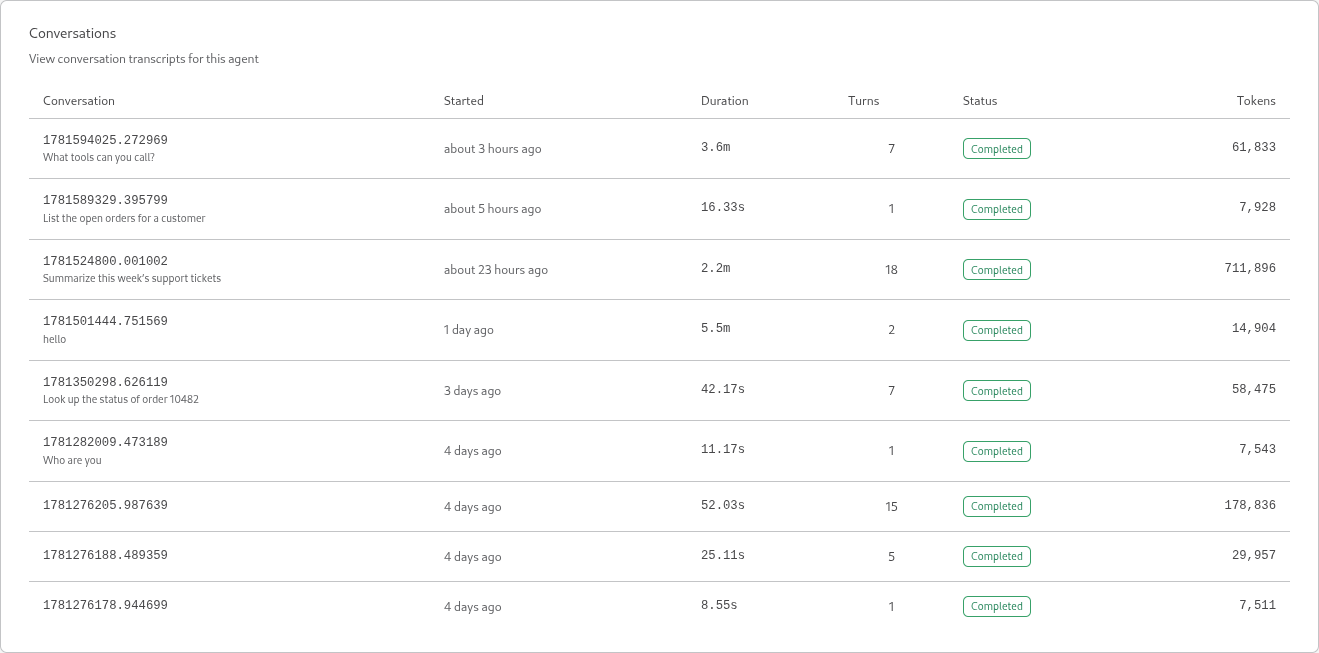
Stamp every request, both the model call and each tool call, with the X-Redpanda-Genai-Conversation header set to your framework’s own session identifier, for example, a chat-thread ID or a request ID. The gateway groups that session’s calls into one transcript on the agent’s Transcripts tab.

This header is required for transcripts. Without it, the gateway drops the spans and the Transcripts tab stays empty. The header does not affect authentication or whether calls succeed.

Each distinct header value becomes one conversation on the Transcripts tab, grouping every model call and tool call that carry it into one row. The Turns column counts the model calls in that conversation, so an agent that loops over several tool calls shows more than one.

The Transcripts tab listing conversations

Framework samples

The Setup tab generates a ready-to-paste sample for your framework, prefilled with your selected provider and MCP servers. Each sample performs the three steps the framework’s way: it runs the client_credentials grant, routes the LLM client and every MCP client through one HTTP client that carries the bearer token, and stamps the framework’s own session identifier as the X-Redpanda-Genai-Conversation header.

The samples read their configuration from these environment variables:

Variable Where to get it

REDPANDA_CLIENT_ID

The Client ID from the Credentials tab.

REDPANDA_CLIENT_SECRET

A client secret you minted on the Credentials tab.

REDPANDA_TOKEN_URL

The token endpoint from the Setup tab, ending in /oauth/idp/token.

REDPANDA_LLM_PROVIDER_URL

The provider-scoped LLM endpoint from the Setup tab, ending in /llm/v1/providers/<provider-name>.

REDPANDA_LLM_PROVIDER_TYPE

The upstream provider family the SDK builds against: openai, anthropic, or google.

REDPANDA_LLM_MODEL

A model the provider serves.

REDPANDA_MCP_BASE_URL

The MCP base endpoint from the Setup tab, ending in /mcp/v1.

REDPANDA_MCP_SERVERS

A comma-separated list of MCP server names to connect, or empty for none.

Set these variables, then run the sample for your framework.

  • ai-sdk-go

  • LangChain

  • CrewAI

  • ADK Java

  • ADK Go

package main

import (
	"context"
	"crypto/rand"
	"encoding/hex"
	"fmt"
	"log"
	"net/http"
	"os"
	"strings"
	"time"

	"golang.org/x/oauth2"
	"golang.org/x/oauth2/clientcredentials"

	"github.com/redpanda-data/ai-sdk-go/agent"
	"github.com/redpanda-data/ai-sdk-go/agent/llmagent"
	"github.com/redpanda-data/ai-sdk-go/llm"
	"github.com/redpanda-data/ai-sdk-go/providers/anthropic"
	"github.com/redpanda-data/ai-sdk-go/providers/google"
	"github.com/redpanda-data/ai-sdk-go/providers/openai"
	"github.com/redpanda-data/ai-sdk-go/runner"
	"github.com/redpanda-data/ai-sdk-go/store/session"
	"github.com/redpanda-data/ai-sdk-go/tool"
	"github.com/redpanda-data/ai-sdk-go/tool/mcp"
)

// convoKey carries the conversation id on the context.
type convoKey struct{}

// convoTransport stamps the session id (read from the context) as the
// conversation header. It sits beneath the oauth2 transport, so one http.Client
// carries the bearer AND the conversation id on the LLM call and every MCP tool
// call.
type convoTransport struct{ base http.RoundTripper }

func (t *convoTransport) RoundTrip(r *http.Request) (*http.Response, error) {
	if id, ok := r.Context().Value(convoKey{}).(string); ok && id != "" {
		r = r.Clone(r.Context())
		r.Header.Set("X-Redpanda-Genai-Conversation", id)
	}
	return t.base.RoundTrip(r)
}

func main() {
	ctx := context.Background()

	// OAuth2 client_credentials: x/oauth2 fetches and refreshes the bearer and
	// its Transport sets it on every request; convoTransport underneath adds the
	// conversation header. One client instruments the LLM call and every MCP call.
	cc := clientcredentials.Config{
		ClientID:     mustEnv("REDPANDA_CLIENT_ID"),
		ClientSecret: mustEnv("REDPANDA_CLIENT_SECRET"),
		TokenURL:     mustEnv("REDPANDA_TOKEN_URL"),
	}
	hc := &http.Client{Transport: &oauth2.Transport{
		Source: cc.TokenSource(ctx),
		Base:   &convoTransport{base: http.DefaultTransport},
	}}

	model, err := buildModel(ctx, hc)
	if err != nil {
		log.Fatal(err)
	}

	// MCP tools ride the SAME client. Each client syncs its server's tools into a
	// shared registry; Start connects and performs that initial sync. The agent
	// is then built from the registry, so the model can actually call the tools.
	registry := tool.NewRegistry(tool.RegistryConfig{})
	mcpBase := mustEnv("REDPANDA_MCP_BASE_URL")
	for _, name := range mcpServers() {
		factory := mcp.NewStreamableTransport(mcpBase+"/"+name, mcp.WithHTTPClient(hc))
		client, err := mcp.NewClient(name, factory,
			mcp.WithRegistry(registry), // sync this server's tools into the registry
			mcp.WithToolTimeout(time.Minute))
		if err != nil {
			log.Fatal(err)
		}
		if err := client.Start(ctx); err != nil {
			log.Fatal(err)
		}
		defer client.Close()
	}

	// WithTools(registry) is what hands the synced MCP tools to the model.
	ag, err := llmagent.New("assistant", "You are a helpful agent.", model,
		llmagent.WithTools(registry))
	if err != nil {
		log.Fatal(err)
	}
	run, err := runner.New(ag, session.NewInMemoryStore())
	if err != nil {
		log.Fatal(err)
	}

	// The runner takes a CALLER-owned conversation id (run.Run keys the session on
	// it; ai-sdk-go does not mint one). Use your app's own id - a chat thread id,
	// request id, A2A contextId - reused across the turn; we mint one here. It is
	// the value convoTransport stamps as X-Redpanda-Genai-Conversation on the model
	// call and every MCP tool call.
	const prompt = "What tools can you call?"
	conversationID := newConversationID()
	ctx = context.WithValue(ctx, convoKey{}, conversationID)

	fmt.Printf("> %s\n\n", prompt)
	msg := llm.NewMessage(llm.RoleUser, llm.NewTextPart(prompt))
	for ev, err := range run.Run(ctx, "user-123", conversationID, msg) {
		if err != nil {
			log.Fatal(err)
		}
		// MessageEvent carries a finished assistant turn (an agentic run may have
		// several). Print its text so you can see the model actually replied.
		if m, ok := ev.(agent.MessageEvent); ok {
			fmt.Println(m.Response.TextContent())
		}
	}
}

// buildModel constructs the native ai-sdk-go model for the configured provider.
// REDPANDA_LLM_PROVIDER_TYPE selects the SDK: "anthropic" and "google" use their
// native wire (the gateway forwards /v1/messages and /v1beta/...:generateContent
// to the upstream), everything else uses OpenAI chat-completions. All three point
// at the same provider-scoped REDPANDA_LLM_PROVIDER_URL. The bearer (set by the
// oauth2 transport) is the real auth; the key arg only satisfies the constructor
// (the gateway ignores the native x-api-key/x-goog-api-key).
func buildModel(ctx context.Context, hc *http.Client) (llm.Model, error) {
	base := mustEnv("REDPANDA_LLM_PROVIDER_URL")
	model := mustEnv("REDPANDA_LLM_MODEL")
	const key = "redpanda-gateway"
	switch strings.ToLower(os.Getenv("REDPANDA_LLM_PROVIDER_TYPE")) {
	case "anthropic":
		p, err := anthropic.NewProvider(key, anthropic.WithBaseURL(base), anthropic.WithHTTPClient(hc))
		if err != nil {
			return nil, err
		}
		return p.NewModel(model)
	case "google", "gemini":
		p, err := google.NewProvider(ctx, key, google.WithBaseURL(base), google.WithHTTPClient(hc))
		if err != nil {
			return nil, err
		}
		return p.NewModel(model)
	default: // openai (and openai-compatible)
		p, err := openai.NewProvider(key, openai.WithBaseURL(base), openai.WithHTTPClient(hc))
		if err != nil {
			return nil, err
		}
		return p.NewModel(model)
	}
}

// mustEnv reads a required env var, exiting with a clear message (not an opaque
// downstream panic) when it is unset. Export the values from the Setup tab.
func mustEnv(k string) string {
	v := os.Getenv(k)
	if v == "" {
		log.Fatalf("missing env var %s - export it from the Setup tab", k)
	}
	return v
}

// newConversationID mints a fresh conversation id. In a real app, use your own
// per-conversation id (chat thread id, request id, A2A contextId) reused across
// the turn, not a value generated per call.
func newConversationID() string {
	b := make([]byte, 8)
	_, _ = rand.Read(b)
	return "conv-" + hex.EncodeToString(b)
}

// mcpServers reads the comma-separated REDPANDA_MCP_SERVERS list. Empty is fine
// - the agent then runs with no MCP tools.
func mcpServers() []string {
	var out []string
	for _, p := range strings.Split(os.Getenv("REDPANDA_MCP_SERVERS"), ",") {
		if p = strings.TrimSpace(p); p != "" {
			out = append(out, p)
		}
	}
	return out
}
import asyncio
import contextvars
import os

import httpx
from langchain_mcp_adapters.client import MultiServerMCPClient
from langgraph.prebuilt import create_react_agent


def env(k: str) -> str:
    """Read a required env var, failing with a clear message (not an opaque
    KeyError) when it is unset. Export the values from the Setup tab."""
    v = os.environ.get(k)
    if not v:
        raise SystemExit(f"missing env var {k} - export it from the Setup tab")
    return v


def get_access_token() -> str:
    """OAuth2 client_credentials grant against the gateway IDP (httpx is already a dep)."""
    resp = httpx.post(
        env("REDPANDA_TOKEN_URL"),
        data={
            "grant_type": "client_credentials",
            "client_id": env("REDPANDA_CLIENT_ID"),
            "client_secret": env("REDPANDA_CLIENT_SECRET"),
        },
    )
    resp.raise_for_status()
    return resp.json()["access_token"]


token = get_access_token()
mcp_base = env("REDPANDA_MCP_BASE_URL")

# The LangGraph thread_id IS the conversation. Carry it in a contextvar so the
# MCP transport reads the current one per request.
thread_var: contextvars.ContextVar[str] = contextvars.ContextVar("thread")


class GatewayAuth(httpx.Auth):
    """MCP headers are fixed per connection, so inject per request via httpx.Auth.

    The default tool mode opens a fresh session per call, so auth_flow re-reads
    the contextvar and always carries the current thread id.
    """

    def auth_flow(self, request):
        request.headers["Authorization"] = f"Bearer {token}"
        request.headers["X-Redpanda-Genai-Conversation"] = thread_var.get()
        yield request


def mcp_servers() -> dict:
    """Build the MultiServerMCPClient connection map from REDPANDA_MCP_SERVERS."""
    servers = {}
    for name in os.environ.get("REDPANDA_MCP_SERVERS", "").split(","):
        name = name.strip()
        if name:
            servers[name] = {
                "transport": "streamable_http",
                "url": f"{mcp_base}/{name}",
                "auth": GatewayAuth(),
            }
    return servers


mcp_client = MultiServerMCPClient(mcp_servers())


def build_model(thread_id: str):
    """Construct the native LangChain chat model for the configured provider.

    REDPANDA_LLM_PROVIDER_TYPE picks the SDK. Auth is the gateway bearer token,
    injected on the Authorization header; the SDK's own api_key field is just a
    non-empty placeholder (the gateway ignores the native x-api-key /
    x-goog-api-key). The thread id rides along as the conversation header.
    """
    model = env("REDPANDA_LLM_MODEL")
    base_url = env("REDPANDA_LLM_PROVIDER_URL")
    headers = {
        "Authorization": f"Bearer {token}",
        "X-Redpanda-Genai-Conversation": thread_id,
    }
    provider = os.environ.get("REDPANDA_LLM_PROVIDER_TYPE", "openai").lower()

    if provider == "anthropic":
        from langchain_anthropic import ChatAnthropic

        return ChatAnthropic(
            model=model,
            base_url=base_url,
            default_headers=headers,
            api_key="unused",  # gateway authenticates on the bearer header
        )

    if provider in ("google", "gemini"):
        from langchain_google_genai import ChatGoogleGenerativeAI

        return ChatGoogleGenerativeAI(
            model=model,
            base_url=base_url,
            api_version="v1beta",  # native Gemini wire under the provider URL
            additional_headers=headers,
            api_key="unused",  # gateway authenticates on the bearer header
        )

    # openai (and openai-compatible)
    from langchain_openai import ChatOpenAI

    return ChatOpenAI(
        model=model,
        base_url=base_url,
        api_key=token,
    ).bind(extra_headers={"X-Redpanda-Genai-Conversation": thread_id})


async def chat(thread_id: str, text: str):
    thread_var.set(thread_id)  # one id per conversation
    tools = await mcp_client.get_tools()

    llm = build_model(thread_id)
    agent = create_react_agent(llm, tools)
    return await agent.ainvoke(
        {"messages": [("user", text)]},
        config={"configurable": {"thread_id": thread_id}},
    )


async def main():
    result = await chat("user-123-thread-1", "What tools can you call?")
    for message in result["messages"]:
        message.pretty_print()


if __name__ == "__main__":
    asyncio.run(main())
import os

import httpx
from crewai import LLM, Agent, Crew, Task
from crewai.llms.hooks import BaseInterceptor
from crewai_tools import MCPServerAdapter


def env(k: str) -> str:
    """Read a required env var, failing with a clear message (not an opaque
    KeyError) when it is unset. Export the values from the Setup tab."""
    v = os.environ.get(k)
    if not v:
        raise SystemExit(f"missing env var {k} - export it from the Setup tab")
    return v


def get_access_token() -> str:
    """OAuth2 client_credentials grant against the gateway IDP (httpx is already a dep)."""
    resp = httpx.post(
        env("REDPANDA_TOKEN_URL"),
        data={
            "grant_type": "client_credentials",
            "client_id": env("REDPANDA_CLIENT_ID"),
            "client_secret": env("REDPANDA_CLIENT_SECRET"),
        },
    )
    resp.raise_for_status()
    return resp.json()["access_token"]


token = get_access_token()
provider_url = env("REDPANDA_LLM_PROVIDER_URL")
provider_type = os.environ.get("REDPANDA_LLM_PROVIDER_TYPE", "openai").lower()
model = env("REDPANDA_LLM_MODEL")
mcp_base = env("REDPANDA_MCP_BASE_URL")

# The gateway authenticates on this Bearer token; the native x-api-key /
# x-goog-api-key are ignored, so the SDK's api_key is just a placeholder.
GATEWAY_API_KEY = "redpanda-gateway"


class GatewayInterceptor(BaseInterceptor):
    """LLM side (OpenAI / Anthropic native clients): stamp the Bearer token and
    the conversation id on every outbound request via a transport interceptor.

    The conversation id is carried per instance so one crew.kickoff() groups
    cleanly. Both the OpenAI and Anthropic native clients build an httpx client
    around this interceptor; Gemini does not support interceptors and is wired
    separately (see build_llm).
    """

    def __init__(self, conversation_id: str) -> None:
        self.conversation_id = conversation_id

    def on_outbound(self, request: httpx.Request) -> httpx.Request:
        request.headers["Authorization"] = f"Bearer {token}"
        request.headers["X-Redpanda-Genai-Conversation"] = self.conversation_id
        return request

    def on_inbound(self, response):
        return response

    async def aon_outbound(self, request):
        return self.on_outbound(request)

    async def aon_inbound(self, response):
        return response


def build_llm(conversation_id: str) -> LLM:
    """Build the native LLM for REDPANDA_LLM_PROVIDER_TYPE, pointed at the
    gateway provider URL and carrying the Bearer token + conversation header.
    """
    if provider_type == "anthropic":
        # Native Anthropic SDK posts to {base_url}/v1/messages. The SDK sends
        # x-api-key natively; the interceptor adds Authorization: Bearer (which
        # the gateway authenticates on) plus the conversation header.
        return LLM(
            provider="anthropic",
            model=model,
            base_url=provider_url,
            api_key=GATEWAY_API_KEY,
            interceptor=GatewayInterceptor(conversation_id),
        )

    if provider_type in ("google", "gemini"):
        # Native google-genai SDK posts to {base_url}/v1beta/models/{model}:generateContent.
        # It does NOT support transport interceptors, so the Bearer token and the
        # conversation header are set as fixed client headers via http_options.
        from google.genai import types

        return LLM(
            provider="gemini",
            model=model,
            api_key=GATEWAY_API_KEY,
            client_params={
                "http_options": types.HttpOptions(
                    base_url=provider_url,
                    headers={
                        "Authorization": f"Bearer {token}",
                        "X-Redpanda-Genai-Conversation": conversation_id,
                    },
                ),
            },
        )

    # openai (and openai-compatible): native OpenAI SDK posts to
    # {base_url}/chat/completions. The interceptor stamps both headers.
    return LLM(
        provider="openai",
        model=model,
        base_url=provider_url,
        api_key=GATEWAY_API_KEY,
        interceptor=GatewayInterceptor(conversation_id),
    )


def mcp_server_params(conversation_id: str) -> list:
    """MCP headers are fixed per connection, so build params per conversation."""
    servers = []
    for name in os.environ.get("REDPANDA_MCP_SERVERS", "").split(","):
        name = name.strip()
        if name:
            servers.append(
                {
                    "url": f"{mcp_base}/{name}",
                    "transport": "streamable-http",
                    "headers": {
                        "Authorization": f"Bearer {token}",
                        "X-Redpanda-Genai-Conversation": conversation_id,
                    },
                }
            )
    return servers


def kickoff(prompt: str, llm: LLM, tools) -> str:
    agent = Agent(role="Assistant", goal="Help the user", backstory="", llm=llm, tools=tools)
    crew = Crew(
        agents=[agent],
        tasks=[Task(description=prompt, agent=agent, expected_output="A reply")],
    )
    return crew.kickoff()


def run_conversation(conversation_id: str, prompt: str) -> str:
    # One crew.kickoff() == one conversation: build the LLM and MCP clients with
    # this id so the model call and every tool call carry the same header.
    llm = build_llm(conversation_id)
    servers = mcp_server_params(conversation_id)
    if not servers:
        return kickoff(prompt, llm, [])
    with MCPServerAdapter(servers) as tools:
        return kickoff(prompt, llm, list(tools))


if __name__ == "__main__":
    print(run_conversation("user-123-conversation-1", "What tools can you call?"))
package com.redpanda.example;

import com.fasterxml.jackson.databind.JsonNode;
import com.fasterxml.jackson.databind.ObjectMapper;
import com.google.adk.agents.LlmAgent;
import com.google.adk.models.langchain4j.LangChain4j;
import com.google.adk.runner.Runner;
import com.google.adk.sessions.InMemorySessionService;
import com.google.adk.sessions.Session;
import com.google.adk.tools.mcp.McpToolset;
import com.google.adk.tools.mcp.StreamableHttpServerParameters;
import com.google.genai.types.Content;
import com.google.genai.types.Part;
import dev.langchain4j.model.anthropic.AnthropicChatModel;
import dev.langchain4j.model.chat.ChatModel;
import dev.langchain4j.model.googleai.GoogleAiGeminiChatModel;
import dev.langchain4j.model.openai.OpenAiChatModel;
import java.net.URI;
import java.net.URLEncoder;
import java.net.http.HttpClient;
import java.net.http.HttpRequest;
import java.net.http.HttpResponse;
import java.nio.charset.StandardCharsets;
import java.util.ArrayList;
import java.util.List;
import java.util.Locale;
import java.util.Map;

public final class Main {

  private Main() {}

  public static void main(String[] args) throws Exception {
    String token = accessToken();
    String appName = "redpanda-self-managed-agent";
    String userId = "user-123";

    // ADK owns the session and mints its id - that id IS the conversation, never
    // a hardcoded constant. langchain4j fixes customHeaders at build time, so we
    // create the session first (createSession with a null id mints one), then
    // pass its id to the chat model and the runner. The same id rides the LLM
    // call and every MCP tool call. One run is one conversation.
    InMemorySessionService sessions = new InMemorySessionService();
    Session session = sessions.createSession(appName, userId).blockingGet();
    String sessionId = session.id();

    String model = env("REDPANDA_LLM_MODEL");
    ChatModel chat = buildChatModel(token, sessionId);

    // MCP: same bearer + conversation id, fixed per toolset construction. The
    // agent is built from the toolsets, so the model can call their tools.
    Map<String, String> mcpHeaders =
        Map.of(
            "Authorization", "Bearer " + token,
            "X-Redpanda-Genai-Conversation", sessionId);
    String mcpBase = env("REDPANDA_MCP_BASE_URL");
    List<Object> tools = new ArrayList<>();
    for (String name : mcpServers()) {
      tools.add(
          new McpToolset(
              StreamableHttpServerParameters.builder()
                  .url(mcpBase + "/" + name)
                  .headers(mcpHeaders)
                  .build()));
    }

    LlmAgent agent =
        LlmAgent.builder()
            .name("assistant")
            .description("Self-managed agent on the Redpanda AI Gateway.")
            .instruction("You are a helpful agent.")
            .model(LangChain4j.builder().chatModel(chat).modelName(model).build())
            .tools(tools)
            .build();

    // Build the runner over the SAME session service, so it sees the session we
    // just minted above.
    Runner runner =
        Runner.builder().agent(agent).appName(appName).sessionService(sessions).build();

    Content message = Content.fromParts(Part.fromText("What tools can you call?"));
    runner
        .runAsync(userId, sessionId, message)
        .blockingForEach(event -> System.out.println(event.stringifyContent()));
  }

  /**
   * buildChatModel constructs the native langchain4j ChatModel for the configured provider.
   *
   * <p>REDPANDA_LLM_PROVIDER_TYPE selects the wire: "anthropic" speaks /v1/messages and "google"
   * speaks /v1beta/...:generateContent (the gateway forwards both to the upstream), everything else
   * speaks OpenAI chat-completions. All three point at the same provider-scoped
   * REDPANDA_LLM_PROVIDER_URL.
   *
   * <p>Auth is the gateway bearer, sent on the Authorization header via langchain4j's
   * customHeaders(Map) - fixed at build time, so it also carries the (fixed) conversation id. The
   * gateway authenticates on that bearer and ignores the native x-api-key/x-goog-api-key, so we
   * never send a real provider key (OpenAI/Anthropic require a non-empty apiKey, so we pass a dummy
   * placeholder; Gemini sends no key at all).
   */
  private static ChatModel buildChatModel(String token, String sessionId) {
    String base = env("REDPANDA_LLM_PROVIDER_URL");
    String model = env("REDPANDA_LLM_MODEL");
    Map<String, String> headers =
        Map.of(
            "Authorization", "Bearer " + token,
            "X-Redpanda-Genai-Conversation", sessionId);
    String type = System.getenv("REDPANDA_LLM_PROVIDER_TYPE");
    switch (type == null ? "" : type.toLowerCase(Locale.ROOT)) {
      case "anthropic":
        // Native Anthropic Messages API. langchain4j posts to {baseUrl}/messages, so the base URL
        // carries the version segment: {provider-url}/v1 -> {provider-url}/v1/messages.
        return AnthropicChatModel.builder()
            .baseUrl(base + "/v1")
            .apiKey("redpanda") // dummy; gateway injects the real key and ignores x-api-key
            .modelName(model)
            .customHeaders(headers)
            .build();
      case "google":
      case "gemini":
        // Native Gemini API. langchain4j posts to {baseUrl}/models/{model}:generateContent, so the
        // base URL carries the version segment: {provider-url}/v1beta. We do NOT call apiKey(...) -
        // leaving it null suppresses the x-goog-api-key header; auth rides the Authorization bearer
        // in customHeaders (requires langchain4j 1.15.0+).
        return GoogleAiGeminiChatModel.builder()
            .baseUrl(base + "/v1beta")
            .modelName(model)
            .customHeaders(headers)
            .build();
      default: // openai (and openai-compatible)
        // OpenAI chat-completions. langchain4j posts to {baseUrl}/chat/completions; the provider
        // URL is the base as-is (the gateway's OpenAI upstream already includes /v1).
        return OpenAiChatModel.builder()
            .baseUrl(base)
            .apiKey("redpanda") // dummy; gateway injects the real key and ignores it
            .modelName(model)
            .customHeaders(headers)
            .build();
    }
  }

  /** mcpServers reads the comma-separated REDPANDA_MCP_SERVERS list. */
  private static List<String> mcpServers() {
    List<String> out = new ArrayList<>();
    String raw = System.getenv("REDPANDA_MCP_SERVERS");
    if (raw != null) {
      for (String name : raw.split(",")) {
        name = name.trim();
        if (!name.isEmpty()) {
          out.add(name);
        }
      }
    }
    return out;
  }

  /** accessToken runs the OAuth2 client_credentials grant against the gateway IDP. */
  private static String accessToken() throws Exception {
    String form =
        "grant_type=client_credentials"
            + "&client_id="
            + enc(env("REDPANDA_CLIENT_ID"))
            + "&client_secret="
            + enc(env("REDPANDA_CLIENT_SECRET"));
    HttpRequest request =
        HttpRequest.newBuilder(URI.create(env("REDPANDA_TOKEN_URL")))
            .header("Content-Type", "application/x-www-form-urlencoded")
            .POST(HttpRequest.BodyPublishers.ofString(form))
            .build();
    HttpResponse<String> response =
        HttpClient.newHttpClient().send(request, HttpResponse.BodyHandlers.ofString());
    JsonNode node = new ObjectMapper().readTree(response.body());
    return node.get("access_token").asText();
  }

  private static String enc(String value) {
    return URLEncoder.encode(value, StandardCharsets.UTF_8);
  }

  /**
   * env reads a required env var, failing with a clear message (not an opaque downstream NPE) when
   * it is unset. Export the values from the Setup tab.
   */
  private static String env(String k) {
    String v = System.getenv(k);
    if (v == null || v.isEmpty()) {
      throw new IllegalStateException("missing env var " + k + " - export it from the Setup tab");
    }
    return v;
  }
}
package main

import (
	"context"
	"fmt"
	"log"
	"net/http"
	"os"
	"strings"

	"golang.org/x/oauth2"
	"golang.org/x/oauth2/clientcredentials"

	"github.com/modelcontextprotocol/go-sdk/mcp"
	"google.golang.org/genai"

	"google.golang.org/adk/agent"
	"google.golang.org/adk/agent/llmagent"
	"google.golang.org/adk/model/gemini"
	"google.golang.org/adk/runner"
	"google.golang.org/adk/session"
	"google.golang.org/adk/tool"
	"google.golang.org/adk/tool/mcptoolset"
)

const appName = "redpanda-self-managed-agent"

// convoKey carries the ADK session id on the context.
type convoKey struct{}

// convoTransport stamps the session id (read from the context) as the
// conversation header. It sits beneath the oauth2 transport, so one http.Client
// carries the bearer AND the conversation id. ADK threads the ctx you pass to
// runner.Run down to both the LLM HTTP call and the MCP tool-call POSTs.
type convoTransport struct{ base http.RoundTripper }

func (t *convoTransport) RoundTrip(r *http.Request) (*http.Response, error) {
	if id, ok := r.Context().Value(convoKey{}).(string); ok && id != "" {
		r = r.Clone(r.Context())
		r.Header.Set("X-Redpanda-Genai-Conversation", id) // = ADK session id
	}
	return t.base.RoundTrip(r)
}

func main() {
	ctx := context.Background()

	// OAuth2 client_credentials: x/oauth2 fetches and refreshes the bearer and
	// its Transport sets it on every request; convoTransport underneath adds the
	// conversation header. One client instruments the LLM call and every MCP call.
	cc := clientcredentials.Config{
		ClientID:     mustEnv("REDPANDA_CLIENT_ID"),
		ClientSecret: mustEnv("REDPANDA_CLIENT_SECRET"),
		TokenURL:     mustEnv("REDPANDA_TOKEN_URL"),
	}
	hc := &http.Client{Transport: &oauth2.Transport{
		Source: cc.TokenSource(ctx),
		Base:   &convoTransport{base: http.DefaultTransport},
	}}

	// genai refuses to construct the Gemini-API client without a non-empty
	// APIKey, but the real auth is the bearer the oauth2 transport sets - this
	// just satisfies the constructor (the gateway ignores the x-goog-api-key).
	model, err := gemini.NewModel(ctx, mustEnv("REDPANDA_LLM_MODEL"), &genai.ClientConfig{
		APIKey:      "redpanda-gateway",
		HTTPClient:  hc,
		HTTPOptions: genai.HTTPOptions{BaseURL: mustEnv("REDPANDA_LLM_PROVIDER_URL")},
	})
	if err != nil {
		log.Fatal(err)
	}

	// Each MCP server becomes a Toolset over the SAME client; the agent is built
	// from them via llmagent.Config.Toolsets, so the model can call the tools.
	mcpBase := mustEnv("REDPANDA_MCP_BASE_URL")
	var toolsets []tool.Toolset
	for _, name := range mcpServers() {
		ts, err := mcptoolset.New(mcptoolset.Config{
			Transport: &mcp.StreamableClientTransport{Endpoint: mcpBase + "/" + name, HTTPClient: hc},
		})
		if err != nil {
			log.Fatal(err)
		}
		toolsets = append(toolsets, ts)
	}

	a, err := llmagent.New(llmagent.Config{
		Name:        "assistant",
		Model:       model,
		Description: "Self-managed agent on the Redpanda AI Gateway.",
		Instruction: "You are a helpful agent.",
		Toolsets:    toolsets,
	})
	if err != nil {
		log.Fatal(err)
	}

	sessionService := session.InMemoryService()
	r, err := runner.New(runner.Config{
		AppName:        appName,
		Agent:          a,
		SessionService: sessionService,
	})
	if err != nil {
		log.Fatal(err)
	}

	// ADK owns the session; its id IS the conversation. Create it, put the id on
	// ctx, and the transport stamps it on the LLM call and every MCP tool call.
	resp, err := sessionService.Create(ctx, &session.CreateRequest{AppName: appName, UserID: "user-123"})
	if err != nil {
		log.Fatal(err)
	}
	sessionID := resp.Session.ID()
	ctx = context.WithValue(ctx, convoKey{}, sessionID)

	const prompt = "What tools can you call?"
	fmt.Printf("> %s\n\n", prompt)
	msg := genai.NewContentFromText(prompt, genai.RoleUser)
	for ev, err := range r.Run(ctx, "user-123", sessionID, msg, agent.RunConfig{}) {
		if err != nil {
			log.Fatal(err)
		}
		if ev.LLMResponse.Content == nil {
			continue
		}
		for _, p := range ev.LLMResponse.Content.Parts {
			fmt.Print(p.Text) // the assistant's reply, streamed as parts arrive
		}
	}
	fmt.Println()
}

// mustEnv reads a required env var, exiting with a clear message (not an opaque
// downstream panic) when it is unset. Export the values from the Setup tab.
func mustEnv(k string) string {
	v := os.Getenv(k)
	if v == "" {
		log.Fatalf("missing env var %s - export it from the Setup tab", k)
	}
	return v
}

// mcpServers reads the comma-separated REDPANDA_MCP_SERVERS list. Empty is fine
// - the agent then runs with no MCP tools.
func mcpServers() []string {
	var out []string
	for _, p := range strings.Split(os.Getenv("REDPANDA_MCP_SERVERS"), ",") {
		if p = strings.TrimSpace(p); p != "" {
			out = append(out, p)
		}
	}
	return out
}
ADK Go ships only Gemini-shaped models, so the ADK Go sample works against a Google provider only. For an OpenAI or Anthropic provider, use one of the other frameworks.

Observe the agent

Because the agent’s traffic flows through the gateway, ADP attributes its activity without any instrumentation in your code:

  • Cost & Usage: Spend, tokens, and latency roll up to the agent. See them on the agent’s Cost & Usage tab and in budgets.

  • Transcripts: Each session that carries the conversation header appears on the agent’s Transcripts tab. See See what your agent did.

Transcript message text is recorded per LLM provider and is off by default. A transcript always shows token usage, latency, and tool calls; it shows the prompt and response text only when input and output message recording is turned on for the provider. See Configure an LLM provider.

Troubleshooting

Symptom What to check

401 on the token request

The Client ID or client secret is wrong, or the secret expired or was revoked. The Client ID must be the full serviceaccounts/<agent-id> value. Issue a new secret on the Credentials tab.

403 with model_not_allowed

The model is not on the provider’s allow-list. Pick a model the provider serves. The Setup tab fills in a valid model for you.

404 from the LLM endpoint

The provider name in the URL does not match a configured provider. Confirm the segment after /providers/ matches the provider’s name exactly.

The Transcripts tab stays empty

The agent is not sending the X-Redpanda-Genai-Conversation header. Stamp it on every model call and tool call with the framework’s session identifier.

A transcript shows usage but no message text

Message recording is off for the agent’s LLM provider. Turn on input and output message recording in the provider settings. Recording applies to future conversations only.