Self-Managed Agent Telemetry Reference
This reference documents the OpenTelemetry ingestion contract for self-managed agents: the OTLP endpoint, the span attributes transcripts require, the request limits, and the validation checks.
Use this reference to:
-
Look up the span attributes a transcript requires
-
Find the endpoint, authentication, and exporter settings for span export
-
Identify why exported spans were rejected or never arrived
Agentic Data Plane assembles a self-managed agent’s Transcripts tab entirely from OpenTelemetry spans the agent exports. Routing LLM and MCP calls through the AI Gateway attributes spend, tokens, and latency on its own, but transcript detail (prompts, responses, tool calls, and timing) exists only in exported spans. A self-managed agent that exports nothing has a permanently empty Transcripts tab. Managed agents don’t need any of this: the managed runtime exports their spans automatically.
The agent’s Setup tab generates a wired, copy-paste sample for your framework that satisfies this contract. Use this page to understand what the generated code does, to adapt it to a framework the picker doesn’t cover, and to diagnose ingestion failures.
OTLP endpoint
Your environment runs an authenticated OpenTelemetry trace endpoint alongside the AI Gateway. Its host is the gateway host with aigw. swapped for otlp.:
https://otlp.<cluster-id>.clusters.rdpa.coThe same base URL serves both transports, so any standard OpenTelemetry SDK exporter works without Redpanda-specific packages:
-
OTLP over HTTP: The SDK appends
/v1/tracesto the base URL. -
OTLP over gRPC: The SDK dials the same host.
The generated environment block configures the exporter with three variables. Copy the exact values from the Setup tab:
| Variable | Value |
|---|---|
|
The environment’s OTLP endpoint. Most SDKs default to |
|
|
|
The agent’s name. |
Authentication and identity
Span exports authenticate with the same client credential the agent already uses for its gateway calls. One credential authorizes the agent’s LLM calls, its MCP tool calls, and its span exports.
-
Each export carries an
Authorization: Bearertoken minted with theclient_credentialsgrant. A token lasts about an hour, so mint tokens as you export rather than pinning one in an environment variable. The samples the Setup tab generates do this for you. -
The endpoint derives the agent, tenant, and organization from the access token and stamps them onto the spans as resource attributes. Identity attributes claimed in the payload are stripped and replaced. You don’t need to configure any attribution headers on the exporter. The
X-Redpanda-Genai-Conversationheader belongs on the agent’s gateway calls, not on span exports. See Group a session’s calls with a conversation ID. -
The end user is the one identity you supply, and it’s optional. See End user attribution.
Span contract
Transcripts read the OpenTelemetry semantic conventions for generative AI: the GenAI span conventions for model and tool spans, and the GenAI agent span conventions for the invoke_agent turn. Every span, not just the root, must carry gen_ai.conversation.id set to a stable identifier for the conversation; spans without it don’t associate with any transcript. The generated samples enforce this with a span processor that stamps the attribute on every span at creation.
Beyond the conversation ID, each kind of span needs its own attributes:
| Span kind | gen_ai.operation.name |
Other required attributes |
|---|---|---|
Turn (one per user request) |
|
None |
Model step |
|
|
Tool call |
|
|
Every span kind also accepts an optional user.id attribute. See End user attribution.
How spans become a transcript:
-
Each distinct
gen_ai.conversation.idbecomes one conversation on the Transcripts tab. -
Each
invoke_agentspan becomes a turn in that conversation. -
Model and tool spans are attributed to a turn by their parent-span chain. When no
invoke_agentancestor is present, they fall back to the turn whose time window covers them. Spans with neither land in a provisional turn of their own.
Open one invoke_agent span per turn. If your framework’s instrumentation already opens one, don’t wrap the call in another. A second span becomes a turn of its own and shows up as an empty turn beside every real one.
End user attribution
Agent, tenant, and organization come from the access token, so an agent can’t claim them. The end user is the exception: to record which person a turn ran for, set the user.id attribute on the turn’s spans yourself.
The value is opaque. Send an email address, an internal account ID, or anything else your system uses to identify a person. Agentic Data Plane records it as you send it and doesn’t interpret it.
Stamp it on the invoke_agent turn span, on every span of the turn, or once as a resource attribute. Any of the three works: a turn takes the value from its invoke_agent span, and falls back to the first of its model and tool spans that carries one.
Nothing verifies the value, so transcripts use it only to label and filter conversations. Access policies, budgets, and cost reporting read the identity derived from the agent’s credential instead. Omit the attribute and the turn reads Unattributed in the transcript. See Who a conversation ran for.
If your agent is already instrumented for another tracing backend, you may not need to stamp anything. Ingestion reads these keys in order and takes the first one that carries a value:
-
user.id -
gen_ai.user.id -
langfuse.user.id -
traceloop.association.properties.user_id -
langsmith.metadata.user_id -
ai.telemetry.metadata.userId -
enduser.id
Message content capture
OpenTelemetry GenAI instrumentation records prompt and response text only when asked, because message content can hold sensitive data. This is a setting in the agent’s own instrumentation, not in Agentic Data Plane. For the Python-based frameworks, the generated environment block enables it with:
export OTEL_INSTRUMENTATION_GENAI_CAPTURE_MESSAGE_CONTENT="SPAN_ONLY"
export OTEL_SEMCONV_STABILITY_OPT_IN="gen_ai_latest_experimental"
Some models return a reply as a list of content blocks instead of a plain string, among them Gemini 3.x, Anthropic with thinking or tool use, and the OpenAI Responses API. Instrumentation that copies such a reply through unchanged records a list where the conventions expect a string, and the transcript then shows the turn without its reply. The generated LangChain sample handles this with a completion hook that rewrites each recorded reply to its text, so copy the current sample from the Setup tab rather than reusing a copy you took earlier.
This is separate from the per-provider Record inputs and Record outputs toggles, which control the message bodies the AI Gateway records for the calls it proxies. See Configure message recording. For a self-managed agent’s transcripts, the text shown comes from the spans the agent exports, so the instrumentation setting is the one that matters.
Ingestion limits
Each export request must stay within these limits:
| Limit | Value |
|---|---|
Spans per request |
10,000 |
Request payload |
4 MiB |
Attributes per span |
256 |
Single attribute value |
4 MiB |
Span timestamps |
Within the last 30 days, up to 10 minutes in the future |
The single attribute value limit matches the request payload limit, so in practice a request that carries a value near that size fails the payload check first.
The limits are enforced in two ways:
-
A request that exceeds the span count or the payload size fails as a whole: the export returns an error and none of its spans are stored. Reduce the exporter’s batch size and resend.
-
The attribute and timestamp limits are enforced per span: the request succeeds with an OTLP partial success naming the rejected span count and the reason, and the remaining spans are stored.
Either way, each rejection appears in the validation log.
Framework caveats
The Setup tab generates samples for ai-sdk-go (the Redpanda AI SDK), ADK Go, Vercel AI SDK, Mastra, LangChain, CrewAI, ADK Python, and ADK Java. Some frameworks' instrumentation limits what a transcript can show:
| Framework | Caveat |
|---|---|
ADK Go |
Its instrumentation carries message text as span events rather than as the attributes a transcript reads. Turns, steps, token counts, and tool calls appear; prompt and response text does not. |
ADK Java |
Its model span is named |
ADK Python |
It records tool arguments and results under its own vendor attributes, so a tool call appears in the transcript without its arguments and result. |
CrewAI |
Its tool execution is not instrumented, so tool calls do not appear as their own transcript rows; the model steps that requested them do. The generated environment block also sets |
Validate ingestion
Spans pass through three stages: received at the OTLP endpoint (authentication, identity stamping, and limit checks), validated for attribution, and assembled into transcripts.
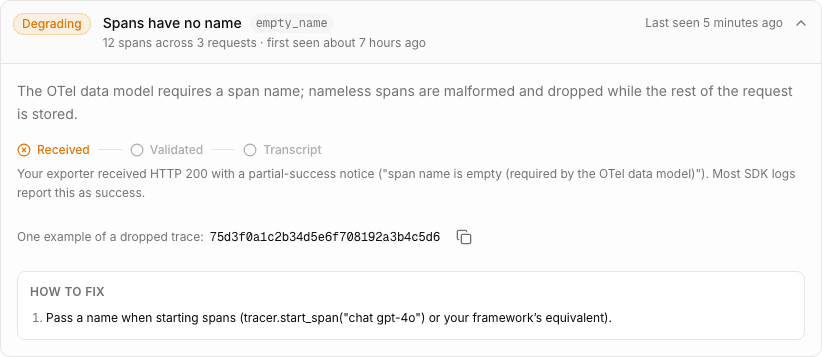
Failures are durable, not just logged. The validation log at the bottom of the agent’s Setup tab shows the rejected telemetry from the last 24 hours, grouped by cause, one entry per problem, with the evidence and the fix.
When telemetry is rejected, expand an issue to see its evidence and suggested fix.
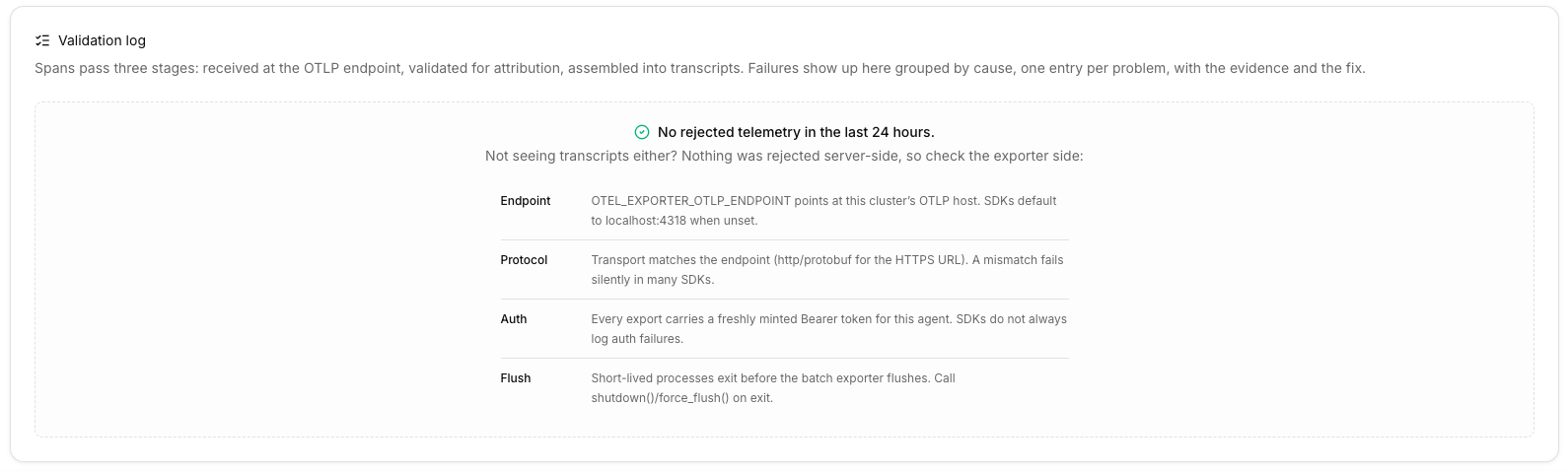
The log records only permanent drops, so an empty log cannot distinguish a clean export from an agent that never sent anything. If the log is empty and the Transcripts tab is too, nothing was rejected server-side, so check the exporter side:
| Check | What to confirm |
|---|---|
Endpoint |
|
Protocol |
The transport matches the endpoint ( |
Auth |
Every export carries a freshly minted bearer token for this agent. SDKs do not always log authentication failures. |
Flush |
Short-lived processes exit before the batch exporter flushes. Call |
One trap looks identical to an agent that never sent anything: an export authorized with a valid token that is not this agent’s credential (for example, a user token or a plain service-account token) is rejected, but the rejection carries no agent identity, so it never appears as one of this agent’s issues. When the cluster rejected such exports in the last 24 hours, the empty validation log shows a cluster-wide warning about requests that carried a valid credential that is not an agent credential. If everything else checks out, confirm the exporter authenticates with the agent’s own client credential from its Credentials tab.
