LEFT JOIN
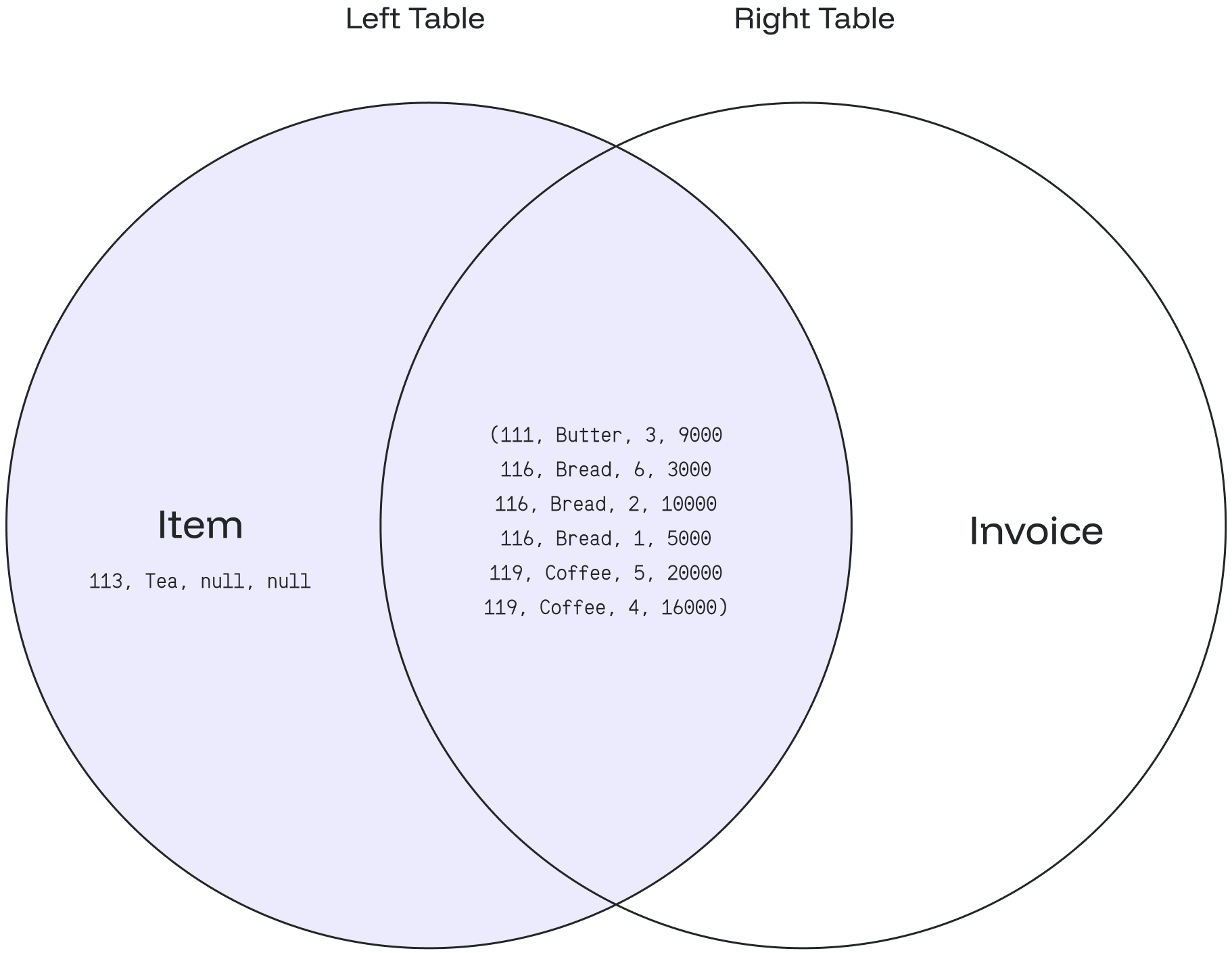
The LEFT JOIN returns all matching records from the left table combined with the right table. Even if there are no matching records in the right table, the LEFT JOIN still returns a row in the result, with NULL in each column from the right table.
|
|
Syntax
SELECT column_1, column_2...
FROM table_1
LEFT JOIN table_2
ON table_1.matching_field = table_2.matching_field;
In this syntax:
-
SELECT column_1, column_2…defines the columns from both tables where the data is to be selected. -
FROM table_1defines the left table as the main table in theFROMclause. -
LEFT JOIN table_2defines the right table as the table the main table joins. -
ON table_1.matching_field = table_2.matching_fieldsets the join condition after theONkeyword with the matching field between the two tables.
Examples
Create the item table:
CREATE TABLE item (
  item_no int NOT NULL,
  item_name text
);

INSERT INTO item
    (item_no,item_name)
VALUES
    (111,'Butter'),
    (113,'Tea'),
    (116,'Bread'),
    (119,'Coffee');
SELECT * FROM item;This returns:
+-----------+----------------+
| item_no   | item_name      |
+-----------+----------------+
| 111       | Butter         |
| 113       | Tea            |
| 116       | Bread          |
| 119       | Coffee         |
+-----------+----------------+
Create the invoice table:
CREATE TABLE invoice (
  inv_no int NOT NULL,
  item int,
  sold_qty int,
  sold_price int
);

INSERT INTO invoice
    (inv_no, item, sold_qty, sold_price)
VALUES
    (020219,111,3,9000),
    (020220,116,6,30000),
    (020221,116,2,10000),
    (020222,116,1,5000),
    (020223,119,5,20000),
    (020224,119,4,16000);
SELECT * FROM invoice;This returns:
+----------+---------+-----------+-------------+
| inv_no   | item    | sold_qty  | sold_price  |
+----------+---------+-----------+-------------+
| 20219    | 111     | 3         | 9000        |
| 20220    | 116     | 6         | 30000       |
| 20221    | 116     | 2         | 10000       |
| 20222    | 116     | 1         | 5000        |
| 20223    | 119     | 5         | 20000       |
| 20224    | 119     | 4         | 16000       |
+----------+---------+-----------+-------------+
A LEFT JOIN query against these tables:
SELECT item_no, item_name, sold_qty, sold_price
FROM item
LEFT JOIN invoice
ON item.item_no = invoice.item;-
The
itemtable is the left table, and theinvoicetable is the right table. -
The query combines values from the
itemtable usingitem_noand matches records using theitemcolumn from theinvoicetable. -
When records match, Redpanda SQL creates a new row with
item_no,item_name,sold_qty, andsold_pricecolumns as defined in theSELECTclause. -
Otherwise, a new row is created with
NULLvalues from the right table (invoice).
The query returns:
+-----------+-------------+------------+---------------+
| item_no   | item_name   | sold_qty   | sold_price    |
+-----------+-------------+------------+---------------+
| 111       | Butter      | 3          | 9000          |
| 113       | Tea         | null       | null          |
| 116       | Bread       | 6          | 30000         |
| 116       | Bread       | 2          | 10000         |
| 116       | Bread       | 1          | 5000          |
| 119       | Coffee      | 5          | 20000         |
| 119       | Coffee      | 4          | 16000         |
+-----------+-------------+------------+---------------+
Based on the data from the item and invoice tables:
-
The result matches the total items in the
itemtable: four items. -
The result displays all items from the left table (
item), even if one item has not been sold. -
Item id
111(Butter) has been sold once for 3 pieces at 9000. -
Item id
113(Tea) has never been sold, so thesold_qtyandsold_pricecolumns areNULL. -
Item id
116(Bread) has been sold three times: 6 pieces at 30000, 2 pieces at 10000, and 1 piece at 5000. -
Item id
119(Coffee) has been sold twice: 5 pieces at 20000 and 4 pieces at 16000.
|
An |
The following Venn diagram illustrates the LEFT JOIN: