Deploy a Stretch Cluster on Kubernetes
|
This feature requires an enterprise license. To get a trial license key or extend your trial period, generate a new trial license key. To purchase a license, contact Redpanda Sales. If Redpanda has enterprise features enabled and it cannot find a valid license, restrictions apply. |
Get high availability across regions or data centers by running a single logical Redpanda cluster, called a Stretch Cluster, across multiple Kubernetes clusters. A Stretch Cluster gives Apache Kafka® workloads synchronous multi-region replication: it fails over automatically through Raft consensus, you manage it as a single unit, and existing Kafka clients and applications work with it unchanged through Redpanda’s Kafka-compatible API.
| To compare this topology with the other deployment options, see Choose Your Deployment. For asynchronous disaster recovery between two independent clusters, see Shadowing Overview. |
After reading this page, you will be able to:
-
Install multicluster operators with bootstrapped TLS certificates across Kubernetes clusters
-
Deploy StretchCluster and RedpandaBrokerPool resources to form a single Redpanda cluster
-
Diagnose and resolve common Stretch Cluster deployment issues
A Stretch Cluster deployment includes:
-
StretchCluster resource: Cluster-wide configuration, including the Redpanda version, listeners, and networking mode.
-
RedpandaBrokerPool resources: Groups of brokers in each Kubernetes cluster, with per-pool replica counts, resources, and storage.
-
Multicluster operators: One Redpanda Operator in each Kubernetes cluster. The operators coordinate through Raft consensus to manage the Stretch Cluster as a single unit. The rpk commands for this operator plane live under
rpk k8s multicluster. -
Cross-cluster networking: Direct broker-to-broker communication across Kubernetes clusters for Raft replication.
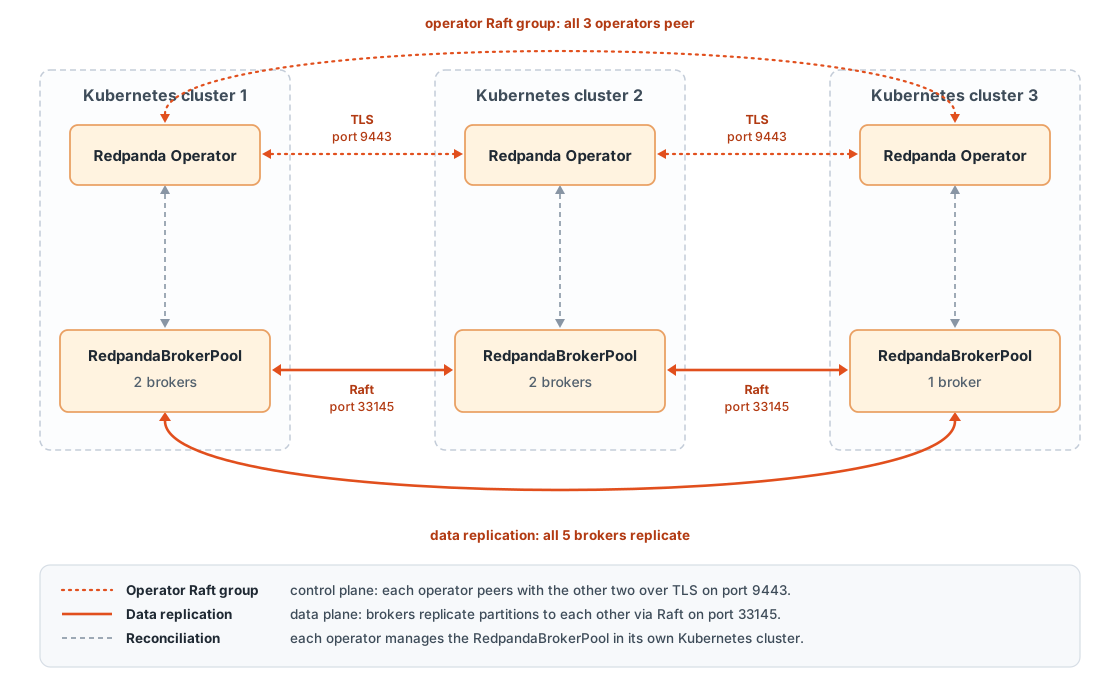
The operators form the control plane: they coordinate through their own Raft group over TLS and manage the StretchCluster as a single unit. The brokers form the data plane: they replicate partition data directly with each other across clusters, without going through the operators.
This design protects the control plane against split brain. You install every operator with the same fixed peer list (multicluster.peers), and the operators elect a single leader through Raft, which drives reconciliation for the whole Stretch Cluster. During a network partition, only the side that holds a majority of the peer list can elect a leader and reconcile changes. Operators on the minority side stop reconciling until the partition heals. Because the operators are not on the data path, brokers continue to serve traffic while reconciliation is paused.
Leader election happens at two levels. Within each Kubernetes cluster, operator replicas elect a local leader through a standard Kubernetes Lease, so you can run multiple operator replicas per cluster for high availability. Across clusters, only each cluster’s local leader participates in the Raft group, representing its cluster with a single identity.
The peer list is fixed at installation time. To add or remove a participating cluster, rerun the bootstrap command with the new set of contexts, then upgrade every operator installation with the updated multicluster.peers list and restart the operator Deployments.
|
Limitations
-
RedpandaBrokerPool scope: RedpandaBrokerPool works only with StretchCluster resources. The CRD is installed only in multicluster mode, and standalone Redpanda resources cannot use it. To manage broker pools in a standalone cluster, use the beta NodePool resource instead.
-
Tiered Storage: Not supported on Stretch Clusters in this release. This also means that features that depend on Tiered Storage are unavailable, including Iceberg topics and Cloud Topics.
-
Distance: Keep all locations on the same continent. Transoceanic deployments are technically possible, but produce latency degrades with distance, and pairwise latencies over the documented budgets cause broker liveness failures. See Prerequisites.
Prerequisites
Before deploying a Stretch Cluster, ensure you have:
-
Redpanda Operator 26.2 or later on each Kubernetes cluster, installed in multicluster mode. Multicluster mode installs the StretchCluster and RedpandaBrokerPool CRDs. See Install multicluster operators.
-
Redpanda Enterprise Edition license: The multicluster operator requires a valid license to start. Contact your Redpanda account team or request a trial license.
-
rpk with the
k8splugin: The rpk CLI version 26.2 or later, with thek8splugin installed:rpk k8s installThe
k8splugin is a managed rpk plugin: it also downloads automatically, with checksum verification, the first time you run anyrpk k8scommand. -
At least three Kubernetes clusters, running a supported Kubernetes version: The operators form a Raft group that needs a quorum of
⌊n/2⌋ + 1members to elect a leader. With three clusters, the deployment tolerates the loss of one cluster. With only two clusters, the loss of either cluster stops the operator control plane, so two-cluster deployments are not recommended. Stretch Clusters work on managed Kubernetes services, including Amazon EKS, Google GKE, and Azure AKS, and on self-managed clusters. -
Cross-cluster networking: One of the networking modes described in Choose a networking mode.
-
Network requirements:
-
Pod-to-pod connectivity between all clusters.
-
Inter-cluster network latency under 50 ms for optimal performance. Broker liveness checks begin to fail above roughly 100 ms, even with WAN tuning. In practice, this means choosing regions on the same continent, for example AWS us-east-1, us-east-2, and us-west-2, or GCP us-east1, us-central1, and us-west1. Measure the pairwise round-trip times between your candidate regions before deploying. Transoceanic links typically exceed this budget. For replication across greater distances, use Shadowing instead.
-
Sufficient bandwidth for cross-cluster replication traffic.
-
-
Kubernetes API access: Each operator must be able to reach the Kubernetes API servers of all peer clusters, and you need a kubeconfig with contexts for all participating clusters to run the bootstrap command.
-
cert-manager: cert-manager installed on all clusters. The operator uses cert-manager to issue TLS certificates for the Redpanda listeners.
You do not need to create TLS certificates for inter-operator communication yourself. The rpk k8s multicluster bootstrap command generates an ECDSA P-256 certificate authority (CA) and per-operator certificates automatically.
|
Choose a networking mode
Brokers in a Stretch Cluster replicate data and maintain Raft consensus across Kubernetes clusters, so every broker must be reachable from every other cluster. Set the mode in the StretchCluster’s spec.networking.crossClusterMode field:
| Mode | How it works | Requirements |
|---|---|---|
|
Per-pod Services use selectors, and a service mesh such as Cilium Cluster Mesh or Istio mirrors the Service endpoints across clusters. |
Service mesh installed on all clusters with multi-cluster federation configured. |
|
The operator renders per-pod Services headless, without selectors, and manages their endpoints with pod IPs directly. Brokers communicate over routable pod IPs. |
CNI configuration that routes pod IPs across clusters, non-overlapping pod CIDR ranges, and firewall rules that allow traffic on the Redpanda ports (by default, 9093 for the Kafka API, 9644 for the Admin API, and 33145 for internal RPC). |
|
The operator exports per-pod Services through the Kubernetes Multi-Cluster Services (MCS) API, and brokers advertise addresses in the |
An MCS API implementation installed on all clusters, such as GKE multi-cluster Services or Submariner. |
Choose flat for the best performance when you control the network infrastructure, mesh when you already run a service mesh with multi-cluster federation, or mcs for a Kubernetes-native approach on platforms that support the MCS API.
Cross-cloud deployments
You can stretch a cluster across Kubernetes clusters in different cloud providers, but you must first make the clouds' networks mutually routable. In addition to the general network requirements, cross-cloud deployments need:
-
Site-to-site VPN connectivity between all clouds: A full mesh of IPsec VPN tunnels between the provider networks, for example AWS VPN Gateway, Google Cloud HA VPN, and Azure VPN Gateway, with BGP or static routes advertising each cloud’s CIDR ranges. Node IPs in every cloud must be routable from the others.
-
Non-overlapping CIDR ranges for the VPC or VNet networks and for the pod networks in every cloud.
-
Pairwise latency under 100 ms between all regions, which means choosing regions on the same continent. Broker liveness checks fail at higher latencies, even with the WAN tuning shown in this page’s StretchCluster example.
-
A CNI that supports cross-cluster networking, such as Cilium with Cluster Mesh (
meshmode), installed in place of each cloud’s default CNI.
Avoid double encryption: if the VPN layer already encrypts all cross-cloud traffic, don’t also enable CNI-level node encryption, such as WireGuard, on the same path.
| Cross-cloud egress is billed at each provider’s internet egress rate, which is typically several times the cost of same-cloud, cross-region traffic. Factor replication traffic into your cost planning. |
Install multicluster operators
Install the Redpanda Operator in multicluster mode on each Kubernetes cluster.
-
Install cert-manager on each cluster, if it’s not already installed:
helm repo add jetstack https://charts.jetstack.io
helm repo update

for ctx in <cluster-1-context> <cluster-2-context> <cluster-3-context>; do
  helm install cert-manager jetstack/cert-manager \
    --kube-context "$ctx" \
    --namespace cert-manager \
    --create-namespace \
    --set crds.enabled=true
done
Replace
<cluster-1-context>,<cluster-2-context>, and<cluster-3-context>with the kubeconfig context names of your clusters. To list your contexts, runkubectl config get-contexts. -
Create a Secret containing your Enterprise Edition license on each cluster:
for ctx in <cluster-1-context> <cluster-2-context> <cluster-3-context>; do kubectl create namespace redpanda --context "$ctx" --dry-run=client -o yaml \ | kubectl apply --context "$ctx" -f - kubectl create secret generic redpanda-license \ --namespace redpanda \ --context "$ctx" \ --from-file=license.key=<path-to-license-file> done -
Bootstrap TLS certificates and peer configuration:
rpk k8s multicluster bootstrap \
  --context <cluster-1-context> \
  --context <cluster-2-context> \
  --context <cluster-3-context> \
  --namespace redpanda \
  --loadbalancer
This command:
-
Generates an ECDSA P-256 CA, valid for 10 years, and an individual certificate for each operator, valid for one year.
-
Provisions a LoadBalancer Service named
<cluster-name>-multicluster-peerin each cluster for operator peer communication on port 9443, and includes the resolved LoadBalancer addresses in the certificate Subject Alternative Names (SANs). -
Creates the TLS and kubeconfig Secrets that the operators read at startup, in the given namespace on each cluster. Every operator caches kubeconfigs for all peer clusters, so a newly elected leader can manage resources in the other clusters immediately.
When the command completes, it prints a
multicluster.peersblock with each cluster’s name and peer address. Use these values in the Helm installation.The bootstrap command uses your kubeconfig context names as the cluster names, which also become the prefixes of the generated Secrets and Services. To use different names, such as us-east, pass--name-override <context>=<name>for each cluster.Bootstrap command flags
Flag Description --contextKubeconfig context of a participating cluster. Repeat for each cluster.
--kubeconfigPath to a kubeconfig file. If you omit
--context, all contexts in the file are used.--namespaceNamespace for the generated Secrets and Services. Default:
redpanda.--loadbalancerProvision a LoadBalancer Service per cluster for peer communication and include its external address in the certificate SANs. Without this flag, use
--dns-overrideto provide the peer addresses.--loadbalancer-timeoutHow long to wait per cluster for a LoadBalancer address. Default:
10m.--dns-overrideOverride or add a peer address for a cluster, in
context=addressformat. Repeat for each override.--name-overrideOverride the cluster name for a context, in
context=nameformat. Defaults to the context name. Repeat for each override.--create-namespaceCreate the namespace if it doesn’t exist. Default:
true.--organizationOrganization field for the generated certificates. Default:
Redpanda.--output=yamlEmit the generated resources as YAML instead of applying them, for GitOps workflows. Use with
--output-dirto write one file per cluster, which is required when emitting TLS Secrets because each cluster’s private key must not be applied to any other cluster.
-
-
Get the addresses required for the Helm installation.
The bootstrap command already printed the peer addresses. To retrieve them again later, read them from the LoadBalancer Services:
for ctx in <cluster-1-context> <cluster-2-context> <cluster-3-context>; do
  kubectl get service "<cluster-name>-multicluster-peer" \
    --namespace redpanda \
    --context "$ctx" \
    -o jsonpath='{.status.loadBalancer.ingress[0].ip}{.status.loadBalancer.ingress[0].hostname}{"\n"}'
done
You also need the Kubernetes API server address of each cluster:
kubectl cluster-info --context <cluster-context> -
Install the Redpanda Operator with multicluster mode enabled on the first cluster:
helm repo add redpanda https://charts.redpanda.com
helm repo update

helm install <cluster-1-name> redpanda/operator \
  --kube-context <cluster-1-context> \
  --namespace redpanda \
  --version v26.2.4 \
  --set fullnameOverride=<cluster-1-name> \
  --set crds.enabled=true \
  --set multicluster.enabled=true \
  --set multicluster.name=<cluster-1-name> \
  --set multicluster.apiServerExternalAddress=<cluster-1-api-server> \
  --set-json 'multicluster.peers=[{"name":"<cluster-1-name>","address":"<cluster-1-peer-address>"},{"name":"<cluster-2-name>","address":"<cluster-2-peer-address>"},{"name":"<cluster-3-name>","address":"<cluster-3-peer-address>"}]' \
  --set enterprise.licenseSecretRef.name=redpanda-license \
  --set enterprise.licenseSecretRef.key=license.key
Replace the placeholders:
-
<cluster-1-name>: The cluster’s name from the bootstrap output. This is the kubeconfig context name unless you passed--name-override. -
<cluster-1-api-server>: The API server address fromkubectl cluster-info. It must be reachable from the other clusters. -
<cluster-N-peer-address>: The peer addresses from the bootstrap output.
The fullnameOverrideandmulticluster.namevalues must match the cluster’s name from the bootstrap output. The operator reads the Secrets that the bootstrap command created, and their names are derived from the cluster name. Themulticluster.peerslist must contain all clusters, including the one you’re installing on, and must be identical in every installation. The peer addresses are the LoadBalancer addresses from the bootstrap command, not the API server addresses. -
-
Repeat the installation for the other clusters, changing only the release name,
--kube-context,fullnameOverride,multicluster.name, andmulticluster.apiServerExternalAddress. -
Verify that the operators are running:
for ctx in <cluster-1-context> <cluster-2-context> <cluster-3-context>; do
  kubectl get pods --namespace redpanda --context "$ctx"
done
Each operator Pod shows
1/1in theREADYcolumn after the operators form a Raft group. If a Pod does not become ready, see Troubleshooting.
Create the StretchCluster and broker pools
After the operators are running, deploy a StretchCluster resource and one RedpandaBrokerPool for each Kubernetes cluster.
-
(Recommended) Create a Secret containing SASL superuser credentials on each cluster:
ADMIN_PASSWORD=$(openssl rand -base64 24)
echo "Save this password: ${ADMIN_PASSWORD}"

for ctx in <cluster-1-context> <cluster-2-context> <cluster-3-context>; do
  kubectl create secret generic redpanda-users \
    --namespace redpanda \
    --context "$ctx" \
    --from-literal=users.txt="admin:${ADMIN_PASSWORD}:SCRAM-SHA-256" \
    --from-literal=password="${ADMIN_PASSWORD}"
done
The
users.txtkey defines the cluster’s superusers inusername:password:mechanismformat, with one user per line. Thepasswordkey holds the same password on its own, so that the User resource in a later step can reference it. -
Create a StretchCluster resource.
Save the following to
stretchcluster.yaml. You apply this same manifest to every participating cluster, and the spec must be identical everywhere: the operators compare the spec across clusters before reconciling, and if any copy differs, they block changes until the specs are aligned. See StretchCluster specs differ across clusters.apiVersion: cluster.redpanda.com/v1alpha2 kind: StretchCluster metadata: name: cluster namespace: redpanda spec: networking: crossClusterMode: mesh (1) auth: (2) sasl: enabled: true mechanism: SCRAM-SHA-256 secretRef: redpanda-users storage: persistentVolume: enabled: true size: 100Gi resources: cpu: cores: "4" memory: container: max: 8Gi enterprise: licenseSecretRef: name: redpanda-license key: license.key config: cluster: # Five replicas spread over three locations keep a Raft majority # through the loss of any one location. default_topic_replications: 5 # Wait 10 min before relocating replicas off an unavailable broker # to avoid cross-region rebalancing on brief network blips. partition_autobalancing_node_availability_timeout_sec: 600 # Increase the liveness probe interval to accommodate WAN latency. node_status_interval: 1000 # Increase Raft timeouts for WAN latency. raft_heartbeat_timeout_ms: 5000 replicate_append_timeout_ms: 5000 # Cache health metadata longer to reduce cross-cluster API calls. health_monitor_max_metadata_age: 600001 meshis the default. Setflatfor direct pod routing ormcsfor the Multi-Cluster Services API. See Choose a networking mode.2 Omit the authblock to deploy without SASL authentication.secretRefreferences the Secret created in the previous step.For all StretchCluster fields, see the StretchCluster reference.
Apply the manifest to every cluster:
for ctx in <cluster-1-context> <cluster-2-context> <cluster-3-context>; do kubectl apply -f stretchcluster.yaml --context "$ctx" done -
Create one RedpandaBrokerPool for each Kubernetes cluster.
Each RedpandaBrokerPool defines a group of brokers in one Kubernetes cluster and binds to the StretchCluster through
spec.clusterRef.Redpanda Data recommends five brokers distributed 2/2/1 across the three Kubernetes clusters, with
default_topic_replications: 5. The odd broker count means the cluster always keeps a clean three-of-five majority through the loss of any one location, with the single-broker location acting as a tiebreaker. With five replicas on five brokers, every broker also holds a replica of every partition, so any surviving location holds a complete copy of the data even if the cluster loses quorum. Save the following tobrokerpool-cluster1.yaml:apiVersion: cluster.redpanda.com/v1alpha2 kind: RedpandaBrokerPool metadata: name: pool-<cluster-1-name> namespace: redpanda spec: clusterRef: (1) group: cluster.redpanda.com kind: StretchCluster name: cluster replicas: 2 # 2/2/1 across the three clusters image: (2) repository: docker.redpanda.com/redpandadata/redpanda tag: v26.2.5 tls: (3) enabled: true certs: default: caEnabled: true services: perPod: (4) local: annotations: service.cilium.io/global: "true" remote: annotations: service.cilium.io/global: "true"1 References the StretchCluster. The groupmust be the bare API group (cluster.redpanda.com), without a version suffix.2 The Redpanda image. Use the same image in every pool. 3 TLS for the Redpanda listeners, issued through cert-manager. Use the same TLS configuration in every pool. 4 Annotations for the per-pod Services. This example enables cross-cluster service discovery for Cilium Cluster Mesh ( meshmode). Adjust or omit the annotations for your networking mode.For all RedpandaBrokerPool fields, see the RedpandaBrokerPool reference.
Apply each pool to its own cluster, changing
metadata.namefor each one and settingreplicasto 2, 2, and 1:kubectl apply -f brokerpool-cluster1.yaml --context <cluster-1-context>To spread partition replicas across failure domains within each Kubernetes cluster, set spec.rackAwareness.enabled: trueon the pool. Rack awareness requires the operator Helm chart to be installed withrbac.createAdditionalControllerCRs=true. See Enable Rack Awareness in Kubernetes. -
Verify that the StretchCluster is ready and the pools are bound:
kubectl get stretchcluster --namespace redpanda --context <cluster-1-context>
kubectl get redpandabrokerpool --namespace redpanda --context <cluster-1-context>
The StretchCluster’s
READYcolumn showsTruewhen the cluster is fully operational. Each cluster creates a StatefulSet and Pods for its local pool. -
If you enabled SASL, create the superuser’s credentials with a User resource.
The
users.txtSecret defines which users are superusers, but does not create their login credentials. Save the following touser-admin.yamland apply it to one cluster:apiVersion: cluster.redpanda.com/v1alpha2 kind: User metadata: name: admin namespace: redpanda spec: cluster: clusterRef: group: cluster.redpanda.com kind: StretchCluster name: cluster authentication: type: scram-sha-256 password: valueFrom: secretKeyRef: name: redpanda-users key: passwordkubectl apply -f user-admin.yaml --context <cluster-1-context> kubectl get user --namespace redpanda --context <cluster-1-context>The
SYNCEDcolumn showsTruewhen the user is created. For more details about the User resource, see Manage Users and ACLs with the Redpanda Operator. -
After all brokers are running, verify that they form a single cluster:
kubectl exec --namespace redpanda --context <cluster-1-context> -it <pod-name> -- \
  rpk cluster info -X user=admin -X pass=<admin-password> -X sasl.mechanism=SCRAM-SHA-256
The output lists the brokers from all pools across all Kubernetes clusters. If you deployed without SASL, omit the
-Xflags.
Understand failure scenarios
With the recommended 2/2/1 layout and default_topic_replications: 5, at most two of any partition’s five replicas share a location, so the deployment behaves as follows:
-
One location down: Every partition keeps a three-of-five majority, leaders re-elect automatically (along your leader preference, if set), and clients keep working with zero data loss. After the configured timeouts, continuous partition balancing decommissions the unreachable brokers (see Automatically eject ghost brokers). When the location returns, its brokers rejoin as fresh brokers, replication is fully restored, and pinned leaders migrate back.
-
Two or more locations down: Partitions lose their Raft majority and the cluster stops serving writes, and the operator control plane loses quorum and stops reconciling. This is an availability outage, not data loss: acknowledged writes persist on the surviving disks, and the cluster resumes when a location is restored. If a lost location cannot be restored, contact Redpanda Support before attempting recovery.
-
Beyond quorum loss: A Stretch Cluster cannot survive the simultaneous loss of a majority of its locations. For protection against failures of that scale, or for an isolated recovery copy, use Shadowing between independent clusters. Failing over to a shadow cluster costs a replication-lag window (a recovery point objective, or RPO, greater than zero) and requires repointing clients. For how the two features combine, see Stretch Clusters and Shadowing.
Optimize for region failures
To keep a Stretch Cluster performing predictably through a region outage, enable rack awareness on every broker pool, pin partition leaders near your clients, and let Redpanda eject brokers that are permanently gone.
Enable rack awareness on broker pools
Rack awareness is the foundation for both leader pinning and safe replica placement. Set it on each RedpandaBrokerPool:
spec:
  rbac:
    enabled: true (1)
  rackAwareness:
    enabled: true
nodeAnnotation: topology.kubernetes.io/zone (2)| 1 | Rack awareness requires per-pool RBAC, and the operator Helm chart must be installed with rbac.createAdditionalControllerCRs=true. |
| 2 | The Kubernetes Node label whose value becomes each broker’s rack ID. The default is topology.kubernetes.io/zone, which gives each availability zone its own rack. To treat each Kubernetes cluster or region as one rack, use a label whose value is shared by all nodes in that cluster, such as topology.kubernetes.io/region. |
Pin partition leaders near your clients
Without a leader preference, partition leaders can move to any region after a failure, including regions far from your producers. For example, when a broker fails and its replacement starts in a distant region, leaders can end up there. Pin leaders to the racks closest to your clients with the config.cluster.default_leaders_preference cluster property in the StretchCluster spec:
spec:
  config:
    cluster:
default_leaders_preference: "ordered_racks:<region-1>,<region-2>" (1)| 1 | Rack IDs in priority order, which are the values of the node label configured in rackAwareness.nodeAnnotation. Redpanda places leaders in the first listed rack when it’s available and fails over down the list in order. ordered_racks requires Redpanda 26.1 or later. To balance leaders across racks without a priority order, use racks:<rack-1>,<rack-2> instead. |
Leaders fail over along the preference list when the preferred racks are unavailable and move back automatically when they recover. To let consumers read from replicas in their own region instead of fetching from a leader in another region, pair leader pinning with follower fetching. For details, see Configure Leader Pinning.
Automatically eject ghost brokers
When an entire region is lost, its brokers remain in the cluster as unreachable "ghost" brokers until they are decommissioned. With continuous partition balancing, Redpanda decommissions them automatically after the configured timeouts, so you don’t have to clean up stale brokers manually after a regional outage:
spec:
  config:
    cluster:
      partition_autobalancing_mode: continuous (1)
      # Wait before moving partitions off an unavailable broker.
      partition_autobalancing_node_availability_timeout_sec: 600
      # After this additional timeout, decommission the broker entirely.
partition_autobalancing_node_autodecommission_timeout_sec: 3600 (2)| 1 | Automatic ejection applies only in continuous mode, which is an Enterprise feature. |
| 2 | The total time before an unreachable broker is ejected is approximately the availability timeout plus the auto-decommission timeout. |
| Keep these timeouts comfortably longer than any transient cross-region network disruption you expect. If they’re too short, a brief WAN outage can trigger cross-region partition rebalancing or even decommission healthy brokers. |
Upgrade the operators
Upgrade the multicluster operators one Kubernetes cluster at a time. The operator Raft group needs a quorum of ⌊n/2⌋ + 1 members, so upgrading two operators at once in a three-cluster deployment drops quorum and stalls reconciliation until the operators rejoin.
-
Before you start, verify that the Raft group is healthy on every cluster with
rpk k8s multicluster status:rpk k8s multicluster status \ --context <cluster-1-context> \ --context <cluster-2-context> \ --context <cluster-3-context> \ --namespace redpanda -
Run
helm upgradeon the first cluster, then wait for that cluster’s operator Deployment to roll and for the Raft group to report healthy again. -
Repeat for each remaining cluster, one at a time.
The operators are not on the data path. While an operator restarts, the brokers continue to serve traffic; only reconciliation of new changes pauses.
Troubleshooting
Run the diagnostic command to check the health of a multicluster deployment:
rpk k8s multicluster status \
  --context <cluster-1-context> \
  --context <cluster-2-context> \
  --context <cluster-3-context> \
--namespace redpandaThis command validates:
-
Operator Pod health and Deployment configuration
-
TLS certificate validity and SANs
-
Raft consensus state and leader agreement
-
Unique cluster names across all peers
-
Peer configuration consistency
-
CA certificate consistency across clusters
To collect a diagnostics bundle for Redpanda Support, run rpk k8s multicluster bundle with the same connection flags.
Operators not forming a Raft group
If operator Pods remain in the 0/1 READY state and logs show unreachable peer messages:
-
Check the operator logs for TLS or peer connection errors:
kubectl logs --namespace redpanda --context <cluster-context> -l app.kubernetes.io/name=operator --tail=100 -
Verify that the bootstrap-created Secrets exist on each cluster:
kubectl get secrets --namespace redpanda --context <cluster-context> | grep multicluster -
Check the certificate contents and SANs:
kubectl get secret <secret-name> --namespace redpanda --context <cluster-context> \
  -o jsonpath='{.data.tls\.crt}' | base64 -d | openssl x509 -text -noout
The SANs must include the peer addresses configured in
multicluster.peers. If the LoadBalancer addresses changed after bootstrap, rerun the bootstrap command to regenerate the certificates, then restart the operator Deployments on all clusters. Each bootstrap run generates a new CA, and the operators load their certificates only at startup. -
Verify network connectivity to the peer Services on port 9443 from inside each cluster.
RedpandaBrokerPools not binding to the StretchCluster
If RedpandaBrokerPool resources don’t report Bound:
-
Check the StretchCluster’s conditions for error messages:
kubectl get stretchcluster --namespace redpanda -o yaml -
Verify that each pool’s
clusterRefmatches the StretchCluster’s name:kubectl get redpandabrokerpool --namespace redpanda \ -o jsonpath='{range .items[*]}{.metadata.name}{": "}{.spec.clusterRef.name}{"\n"}{end}' -
Check the operator logs for role-based access control (RBAC) errors:
kubectl logs --namespace redpanda -l app.kubernetes.io/name=operator | grep -i "forbidden\|unauthorized"
StretchCluster specs differ across clusters
If you change the StretchCluster on one cluster but not the others, the operators detect the drift and block all changes until the specs are aligned. While blocked, the operators still remediate local failures, such as restarting downed pods, but do not apply any spec changes.
The drift is reported in the StretchCluster’s SpecSynced condition and in the operator logs:
kubectl get stretchcluster <name> --namespace redpanda --context <cluster-context> \
  -o jsonpath='{.status.conditions[?(@.type=="SpecSynced")].message}'
The message names the clusters and the top-level fields that differ, for example StretchCluster .spec differs on clusters: <cluster-name> (fields: config). To recover, apply the same manifest to every cluster.
Bootstrap user password mismatch
If the StretchCluster doesn’t deploy brokers and the operator logs show bootstrap user password mismatch, the operators created the internal <stretchcluster-name>-bootstrap-user Secret independently with different passwords. This can happen when the StretchCluster manifest is applied to all clusters at nearly the same time.
Find the Raft leader with rpk k8s multicluster status, compare the Secret across clusters, then delete the copies that differ from the leader’s cluster and let the operator recreate them:
for ctx in <cluster-1-context> <cluster-2-context> <cluster-3-context>; do
  printf '%s: ' "$ctx"
  kubectl get secret cluster-bootstrap-user --namespace redpanda --context "$ctx" \
    -o jsonpath='{.data.password}' | sha256sum
done

kubectl delete secret cluster-bootstrap-user --namespace redpanda --context <mismatched-cluster-context>
If the StretchCluster still reports no brokers after the Secrets converge, restart the operator Deployments to clear the stalled reconciliation:
for ctx in <cluster-1-context> <cluster-2-context> <cluster-3-context>; do
  kubectl rollout restart deployment --namespace redpanda --context "$ctx"
done
Broker crash-loops after its region recovers
If a region comes back online after its broker was automatically decommissioned (see Automatically eject ghost brokers), the returning broker cannot rejoin with its old identity: the pod starts but never becomes ready, and its logs show that the broker was removed from the cluster.
The operator recovers from this automatically. When the pod stays not-ready past a threshold (five minutes by default) and its on-disk identity conflicts with the cluster’s authoritative broker list, the operator wipes the stale disk by deleting the pod’s PersistentVolumeClaim and Pod. The broker reschedules onto a fresh disk, joins with a new broker ID, and continuous balancing moves partition replicas back onto it. To change the threshold, set the operator’s --wipe-stale-disk-after flag. A negative duration disables the wipe.
To recover immediately, or if you disabled the automatic wipe, delete the broker’s PersistentVolumeClaim and Pod yourself:
kubectl delete pvc <data-pvc-name> --namespace redpanda --context <recovered-cluster-context> --wait=false
kubectl delete pod <broker-pod-name> --namespace redpanda --context <recovered-cluster-context>
Brokers cannot communicate across clusters
If brokers in different Kubernetes clusters cannot reach each other:
-
Get a broker Pod IP from another cluster and test connectivity from the local cluster:
kubectl get pods --namespace redpanda --context <other-cluster-context> -o wide kubectl run -it --rm debug --image=busybox --restart=Never -- \ nc -zv <broker-pod-ip> 33145 -
Check for NetworkPolicies that block cross-cluster traffic:
kubectl get networkpolicy --namespace redpanda -
For
flatmode, verify that routes to the remote pod CIDRs exist. Formeshmode, verify that the per-pod Services are mirrored to the remote clusters. Formcsmode, verify thatServiceExportandServiceImportresources exist for the per-pod Services. -
Review the broker logs for connection errors:
kubectl logs --namespace redpanda <broker-pod-name> | grep -i "connection\|error"
Next steps
-
Enable rack awareness to optimize replica placement across failure domains within each Kubernetes cluster.
-
Monitor your Stretch Cluster to scrape the operator metrics and deploy the prebuilt Grafana dashboard.
-
Configure leader pinning to keep partition leaders in specific regions for latency optimization.
-
Configure cluster balancing for automatic partition rebalancing across brokers.
