Redpanda Schema Registry
In Redpanda, the messages exchanged between producers and consumers contain raw bytes. Schemas enable producers and consumers to share the information needed to serialize and deserialize those messages. They register and retrieve the schemas they use in the Schema Registry to ensure data verification.
Schemas are versioned, and the registry supports configurable compatibility modes between schema versions. When a producer or a consumer requests to register a schema change, the registry checks for schema compatibility and returns an error for an incompatible change. Compatibility modes can ensure that data flowing through a system is well-structured and easily evolves.
|
Schema size best practice: Schema Registry works best with schemas of 128KB in size or less. Large schemas can consume significant memory resources and may cause system instability or crashes, particularly in memory-constrained environments. For Protobuf and Avro schemas, Redpanda recommends using schema references to break up large schemas into smaller constituent parts. |
|
The Schema Registry is built directly into the Redpanda binary. It runs out of the box with Redpanda’s default configuration, and it requires no new binaries to install and no new services to deploy or maintain. You can use it with the Schema Registry API or Redpanda Console. |
Schema terminology
Schema: A schema is an external mechanism to describe the structure of data and its encoding. Producer clients and consumer clients use a schema as an agreed-upon format for sending and receiving messages. Schemas enable a loosely coupled, data-centric architecture that minimizes dependencies in code, between teams, and between producers and consumers.
Subject: A subject is a logical grouping for schemas. When data formats are updated, a new version of the schema can be registered under the same subject, allowing for backward and forward compatibility. A subject may have more than one schema version assigned to it, with each schema having a different numeric ID.
Serialization format: A serialization format defines how data is converted into bytes that are transmitted and stored. Serialization, by producers, converts an event into bytes. Redpanda then stores these bytes in topics. Deserialization, by consumers, converts the bytes of arrays back into the desired data format. Redpanda’s Schema Registry supports Avro, Protobuf, and JSON serialization formats.
Canonicalization: Canonicalization converts a schema into a canonical form that removes formatting differences, such as whitespace. Schema Registry canonicalizes every schema you register or look up, and compares schemas by their canonical form. A schema that differs from a registered version only in formatting matches that version. See How Schema Registry matches equivalent schemas.
Normalization: Normalization goes further than canonicalization. It also puts the parts of a schema whose order doesn’t change its meaning into a standard order, such as JSON keys and Protobuf fields. Normalization is opt-in. Request it with the normalize=true query parameter during schema registration and lookup for a subject. Schema Registry supports normalization for Avro, JSON, and Protobuf.
Redpanda design overview
Every broker allows mutating REST calls, so there’s no need to configure leadership or failover strategies. Schemas are stored in a compacted topic, and the registry uses optimistic concurrency control at the topic level to detect and avoid collisions.
|
The Schema Registry publishes an internal topic, |
Redpanda Schema Registry uses the default port 8081.
How Schema Registry matches equivalent schemas
When you register or look up a schema, Schema Registry converts it to its canonical form. It then compares the canonical form with the schemas already registered under the subject. If the schema matches an existing version, Schema Registry returns that version and its schema ID instead of registering a new version. This happens on every request, whether or not you request normalization.
Normalization changes what counts as a match. With normalize=true, Schema Registry also applies the following before it registers or looks up the schema:
-
Avro: Sorts the schema references and removes duplicates.
-
JSON: Sorts the keys of the top-level schema object, and sorts the schema references and removes duplicates.
-
Protobuf: Sorts fields by field number, enum values, reserved ranges and names, extensions, and imports.
Use normalization when producers might submit the same schema with these elements in a different order.
To normalize every request regardless of the normalize parameter, set the schema_registry_always_normalize cluster property to true.
In Redpanda 26.3 and later, a registration can match versions under more than one subject. Schema Registry then returns the match under the requested subject, even when a match under another subject has a higher schema ID.
Canonical text for stored schemas
In Redpanda 26.3 and later, the schema_registry_canonicalize_on_consume cluster property controls which schema types keep canonical text when Schema Registry loads the internal _schemas topic. Valid values are AVRO, JSON, and PROTOBUF.
-
For a listed type, Schema Registry replaces the stored text with its canonical form. The text that Schema Registry returns can differ from the text in
_schemas. -
For a type that isn’t listed, Schema Registry keeps the stored text and returns it unchanged. It records a hash of the canonical form and uses the hash to match versions under the same subject. When you register the schema under another subject, Schema Registry compares the stored text exactly. An equivalent schema of an unlisted type can then receive a new schema ID.
Schemas that you submit through the Schema Registry API are always canonicalized, whatever this property lists.
The default is an empty list, which keeps the stored text for every type. Clusters created on Redpanda 26.2 or earlier keep all three types after they upgrade, which matches their earlier behavior. To change the list, run:
rpk cluster config set schema_registry_canonicalize_on_consume '["AVRO","PROTOBUF"]'The change takes effect after you restart the cluster. It can change the schema text that Schema Registry returns for existing versions. It doesn’t rewrite _schemas, renumber schema IDs, or change schema globally unique identifiers (GUIDs) during the replay.
|
For the types you list, the following actions can change the schema GUID associated with a schema ID:
Records that carry the previous GUID can then fail schema ID validation or deserialization. With an empty list, a schema registered by an older Redpanda version or another schema registry can receive a new schema ID when you register it again under another subject. |
If you use schema GUIDs on a cluster created on Redpanda 26.2 or earlier, set the property to an empty list explicitly:
rpk cluster config set schema_registry_canonicalize_on_consume '[]'Don’t reset the property instead. On an upgraded cluster, resetting it restores the all-types default, not an empty list. Before you switch, consider the risks. Switching can change the schema text that Schema Registry returns for existing versions. An empty list also has the cross-subject schema ID behavior described in the warning. If you don’t use GUIDs, keep the default, because switching has no benefit.
Wire format
With Schema Registry, producers and consumers can use a specific message format, called the wire format. The wire format facilitates a seamless transfer of data by ensuring that clients easily access the correct schema in the Schema Registry for a message.
The wire format is a sequence of bytes consisting of the following:
-
The "magic byte," a single byte that contains the value of 0 in the classic wire format.
-
A four-byte integer containing the schema ID.
-
The rest of the serialized message.
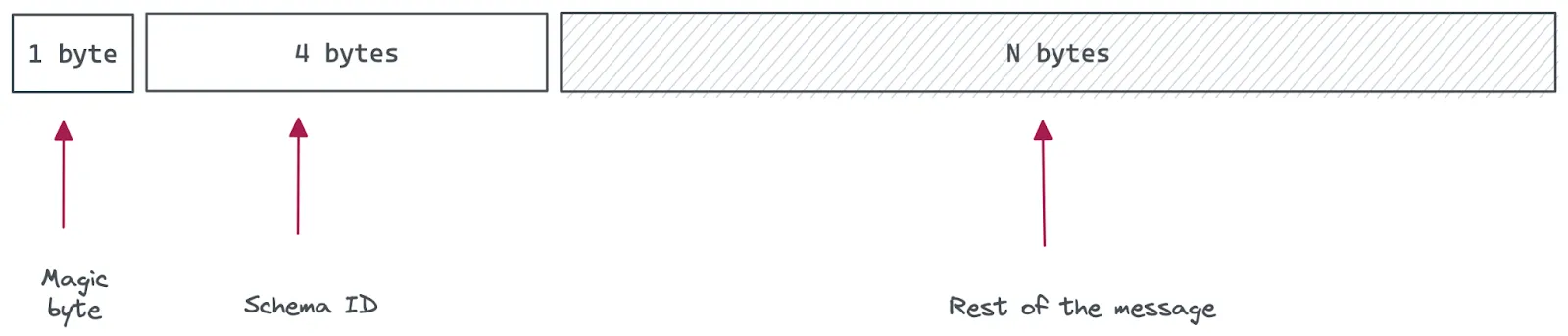
In Redpanda 26.3 and later, a serializer can also write a 16-byte schema globally unique identifier (GUID) after a magic byte of 0x01. It can also write the schema ID or GUID to a reserved record header instead of the payload. Schema ID validation and Iceberg topics accept both. See Schema ID location.
In the serialization process, the producer hands over the message to a key/value serializer that is part of the respective language-specific SDK. The serializer first checks whether the schema ID for the given subject exists in the local schema cache. The serializer derives the subject name based on several strategies, such as the topic name. You can also explicitly set the subject name.
If the schema ID isn’t in the cache, the serializer registers the schema in the Schema Registry and collects the resulting schema ID in the response.
In either case, when the serializer has the schema ID, it pads the beginning of the message with the magic byte and the encoded schema ID, and returns the byte sequence to the producer to write to the topic.
In the deserialization process, the consumer fetches messages from the broker and hands them over to a deserializer. The deserializer first checks the presence of the magic byte and rejects the message if it doesn’t follow the wire format.
The deserializer then reads the schema ID and checks whether that schema exists in its local cache. If it finds the schema, it deserializes the message according to that schema. Otherwise, the deserializer retrieves the schema from the Schema Registry using the schema ID, then the deserializer proceeds with deserialization.
You can also configure brokers to validate that producers use the wire format and the schema exists (but brokers do not validate the full payload). See Server-Side Schema ID Validation for more information.
Produce and consume header-based schema IDs with rpk
In Redpanda 26.3 and later, a client can write a record’s schema locator to a reserved record header. The locator no longer has to go at the start of the key or value. These are the same headers that Confluent’s header-based serializers use: __key_schema_id and __value_schema_id. The locator can be the integer schema ID or the schema’s globally unique identifier (GUID). For the locator forms and how Redpanda reads them, see Schema ID location.
Use rpk to produce and consume records in this format, for example to test producers and consumers that use header-based schema IDs.
Use header mode (--schema-id-location=header) when:
-
Your producers and consumers use Confluent’s header-based serializers.
-
You want the key or value to hold only the serialized message, with no wire format prefix.
Keep the default payload mode when:
-
Consumers read the schema ID only from the start of the key or value. For example, Redpanda Console and versions of
rpkearlier than 26.3 can’t decode header-based schema IDs. -
Records with a schema-encoded key must keep going to the same partition. Header mode changes the key bytes, so the partition can change.
Before you begin, make sure that:
-
Your cluster runs Redpanda 26.3 or later, and you use
rpk26.3 or later. -
Schema Registry has the schema for the record value. The following examples use the topic name strategy, so register the schema under the subject
<topic>-value. See Register a schema.
Produce with the schema GUID in a header
To write the schema GUID to a record header, add --schema-id-location=header to rpk topic produce:
echo '{"user_id":23,"event_type":"BUTTON_CLICK"}' | rpk topic produce <topic> --format='%v\n' --schema-id=topic --schema-id-location=headerReplace <topic> with the name of your topic, and the JSON value with a record that matches your schema.
rpk encodes the value with the schema and writes the schema GUID to the __value_schema_id header. The value holds only the serialized message, with no schema ID prefix. For Protobuf schemas, rpk writes the message indexes to the header too. Keys that you encode with --schema-key-id use the __key_schema_id header the same way.
The --schema-id-location flag works as follows:
-
--schema-id-location=headerrequires--schema-idor--schema-key-id. -
In header mode,
rpkalways writes the schema GUID, not the integer schema ID. -
The default,
--schema-id-location=payload, writes the integer schema ID at the start of the key or value, as earlier versions ofrpkdo.
| Header mode changes the bytes of a schema-encoded key, so records with that key can go to a different partition than in payload mode. |
Consume records that use header-based schema IDs
To decode records that carry the schema ID or GUID in a header, use rpk topic consume with --use-schema-registry:
rpk topic consume <topic> --use-schema-registry --num 1rpk prints the decoded value. You don’t need a flag for the header format. For each key and value, rpk reads the locator from the last __key_schema_id or __value_schema_id header that has a non-null value. If there’s no such header, rpk reads the locator from the start of the key or value. Either location can carry an integer schema ID or a schema GUID.
To resolve a schema GUID, rpk checks these Schema Registry contexts in order and uses the first one that has the GUID:
-
The topic’s context, which the
redpanda.schema.registry.contexttopic property sets. If you set--schema-context,rpkchecks that context instead of the topic context. -
The default context.
-
The first context that Schema Registry returns for the GUID.
Server-side schema ID validation resolves locators only in the topic’s context. See Context resolution.
Schema examples
To experiment with schemas from applications, see the clients in redpanda-labs.
For a basic end-to-end example, this Protobuf schema contains information about products: a unique ID, name, price, and category. It uses the default naming strategy (TopicNameStrategy) with a topic of Orders. (This strategy is suitable when you want to group schemas by the topics to which they are associated.) When the producer registers this schema, the registry assigns it a schema ID; on a registry with no earlier registrations, that ID is 1.
syntax = "proto3";

message Product {
  int32 ProductID = 1;
  string ProductName = 2;
  double Price = 3;
  string Category = 4;
}
The producer uses a Schema Registry-aware serializer, which registers the schema (if it isn’t already registered) and prepends the wire-format header (the magic byte and schema ID) to each serialized message. This example uses the confluent-kafka Python client and its ProtobufSerializer. Before you run the producer, install the client with the Protobuf and Schema Registry extras, and generate the product_pb2 module from product.proto:
pip install "confluent-kafka[protobuf,schemaregistry]"
protoc --python_out=. product.proto
from confluent_kafka import Producer
from confluent_kafka.serialization import SerializationContext, MessageField
from confluent_kafka.schema_registry import SchemaRegistryClient
from confluent_kafka.schema_registry.protobuf import ProtobufSerializer
import product_pb2 # Protobuf class generated from product.proto
# Connect to Schema Registry.
schema_registry_client = SchemaRegistryClient({"url": "http://localhost:8081"}) # Replace with your Schema Registry URL
# The serializer registers the schema and adds the wire-format header to each message.
protobuf_serializer = ProtobufSerializer(
product_pb2.Product,
schema_registry_client,
{"use.deprecated.format": False},
)
producer = Producer({"bootstrap.servers": "localhost:9092"}) # Replace with your broker addresses
product = product_pb2.Product(
ProductID=123,
ProductName="Example Product",
Price=45.99,
Category="Electronics",
)
# Serialize with the Schema Registry-aware serializer, then produce to the Orders topic.
producer.produce(
topic="Orders",
value=protobuf_serializer(
product, SerializationContext("Orders", MessageField.VALUE)
),
)
producer.flush()To add an additional field for product variants, like size or color, the new schema (version 2) would look like this:
syntax = "proto3";

message Product {
  int32 ProductID = 1;
  string ProductName = 2;
  double Price = 3;
  string Category = 4;
  repeated string Variants = 5;
}
You would want the compatibility setting to accommodate adding new fields without breakage. Adding an optional new field to a schema is inherently backward-compatible. New consumers can process events written with the new schema, and older consumers can ignore it.
Avro logical types
In an Avro schema, each field has a type and can declare an optional logicalType. The type is either a primitive type, such as long or string, or a complex type, such as a record, array, or union. A logicalType gives a type a higher-level meaning. For example, a logicalType of timestamp-millis marks a long as a timestamp, and a logicalType of uuid marks a string as a UUID. An implementation that doesn’t recognize a logical type uses the underlying Avro type. For the full list, see the Apache Avro specification.
JSON Schema
All CRUD operations are supported for the JSON Schema (json-schema), and Redpanda supports all published JSON Schema specifications, which include:
-
draft-04
-
draft-06
-
draft-07
-
2019-09
-
2020-12
Limitations
Schemas are held in subjects. Subjects have a compatibility configuration associated with them, either directly specified by a user, or inherited by the default. See PUT /config and PUT/config/{subject} in the Schema Registry API.
JSON Schema supports internal references ($ref using JSON Pointer fragments such as /definitions/… or /$defs/…) and bundled schemas (sub-schemas with their own $id defined within the same document). These work correctly with all compatibility levels.
External references, where $ref points to a schema registered under a different subject, are not supported. To structure complex JSON schemas, define referenced types within the same schema document using definitions / $defs or bundled $id schemas.
Additionally, you cannot have schema ID validation with JSON schemas if the subject name strategy is not TopicNameStrategy.
Metadata properties
Schema Registry lets you store and retrieve arbitrary key-value metadata properties alongside schemas. Properties such as owner, team, or application.version travel with the schema through its lifecycle. You can register a new schema with associated metadata properties by sending a POST request to /subjects/{subject}/versions with a metadata.properties object in the request body:
{
  "schema": "{\"type\":\"string\"}",
  "metadata": {
    "properties": {
      "owner": "platform-team",
      "application.version": "2.1.0"
    }
  }
}
Property values in the request can be strings, numbers, or booleans; Redpanda stores all values as strings (for example, false is stored as "false"). Nested objects and arrays are not supported as property values.
To set metadata using rpk, use the --metadata-properties flag (shorthand: -p). The flag accepts key=value pairs or a JSON string (for example, {"key":"value"}), and you can pass it multiple times to set multiple properties:
# key=value pairs — pass the flag multiple times for multiple properties
rpk registry schema create my-subject --schema schema.avsc \
  --metadata-properties owner=platform-team \
  --metadata-properties env=prod

# JSON string — useful when values contain special characters
rpk registry schema create my-subject --schema schema.avsc \
  --metadata-properties '{"owner":"platform-team","application.version":"2.1.0"}'
Metadata properties are returned on GET /subjects/{subject}/versions/{version} and GET /schemas/ids/{id} responses. To view metadata on an existing schema, add --print-metadata to rpk registry schema get. You cannot combine --print-metadata with --print-schema. You can also view and manage metadata properties in Redpanda Console.
When you register a new schema version without a metadata field, the new version automatically inherits properties from the most recent version of that subject. To avoid inheriting the previous version’s metadata, you can send "metadata": {} to register a schema with explicitly no metadata. Inheritance does not apply to subjects in IMPORT mode: a version imported without a metadata field is stored without metadata. Registering the same schema definition with different metadata properties creates a new schema version with a new schema ID.
Compatibility checks do not consider metadata. Changing only the metadata properties on a schema never causes a compatibility check to fail.
|
Redpanda supports only
|
