Enable Topic Documentation in Redpanda Console
You can embed topic documentation into the Redpanda Console user interface by providing access to a public or private Git repository that hosts the documentation files in Markdown format.
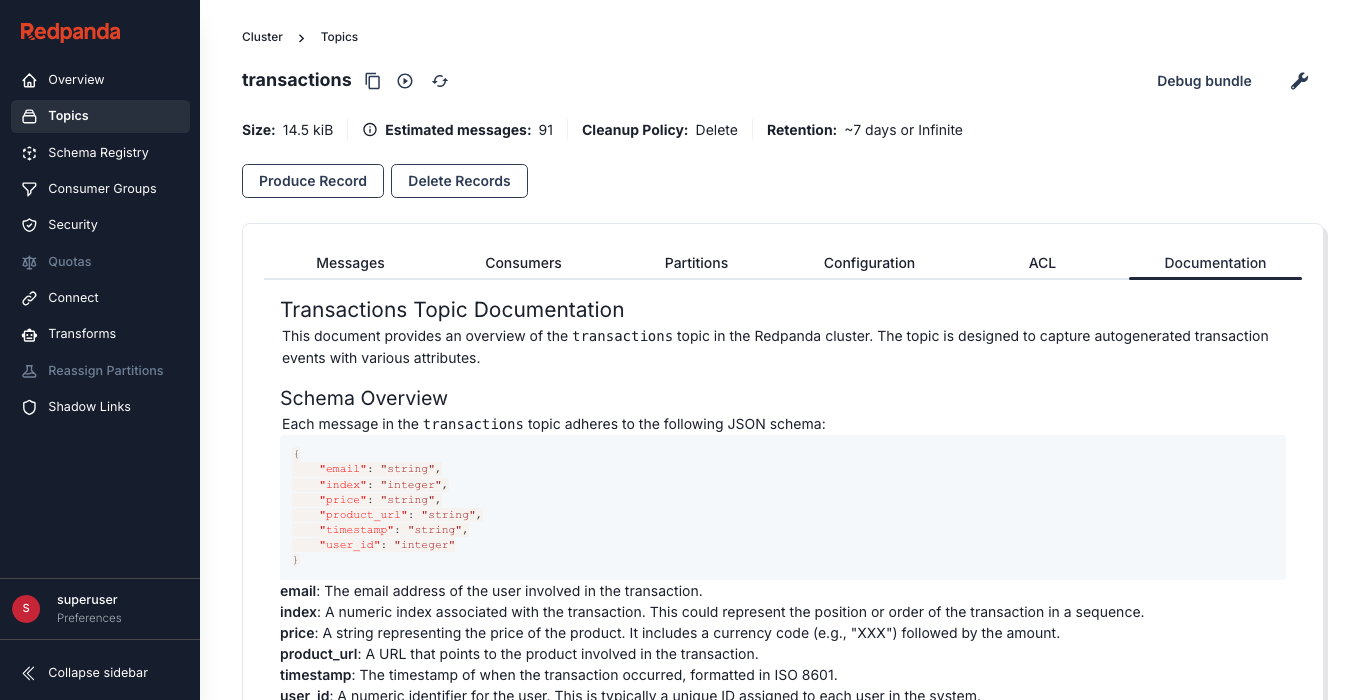
Redpanda Console clones the provided Git repository and stores all Markdown files it finds in memory. The Documentation tab in the frontend displays the content of the Markdown file that matches the name of the Kafka topic.
| Path/Filename | Topic Name | Matches |
|---|---|---|
ordersv2.md |
orders-v2 |
✗ |
Orders-v2.md |
orders-v2 |
✗ |
orders-v2.md |
orders-v2 |
✓ |
/orders/orders-v2.md |
orders-v2 |
✓ |
Repository information
Start by specifying the Git repository that contains the Markdown documentation files. Provide the repository URL, the branch, and the base directory that contains the documentation.
-
Standalone
-
Kubernetes embedded
-
Kubernetes standalone
console:
  topicDocumentation:
    git:
      enabled: true
      repository:
        url: https://github.com/<github-organization>/<repository-name>.git
        branch: <branch-name>
        baseDirectory: <base-directory-path>
When Redpanda Console is part of the Redpanda Helm chart or Operator:
-
Operator
-
Helm
apiVersion: cluster.redpanda.com/v1alpha2
kind: Console
metadata:
  name: redpanda-console
spec:
  clusterRef:
    name: redpanda
  config:
    console:
      topicDocumentation:
        git:
          enabled: true
          repository:
            url: https://github.com/<github-organization>/<repository-name>.git
            branch: <branch-name>
            baseDirectory: <base-directory-path>
console:
enabled: true
console:
config:
  console:
    topicDocumentation:
      git:
        enabled: true
        repository:
          url: https://github.com/<github-organization>/<repository-name>.git
          branch: <branch-name>
baseDirectory: <base-directory-path>When using the standalone Redpanda Console Helm chart:
config:
console:
topicDocumentation:
git:
enabled: true
repository:
url: https://github.com/<github-organization>/<repository-name>.git
branch: <branch-name>
baseDirectory: <base-directory-path>Refresh interval
Define how often Redpanda Console should refresh the documentation from the repository.
console:
  topicDocumentation:
    git:
      enabled: true
refreshInterval: 10m-
refreshInterval: Set a duration like10mto refresh documentation every 10 minutes. Use0to disable automatic refresh.
Authenticate with private Git repositories
If the Git repository is private, Redpanda Console must authenticate using either:
-
A GitHub Personal Access Token (PAT) over HTTPS (basic auth)
Authenticate using a GitHub Personal Access Token (PAT)
-
Standalone
-
Kubernetes embedded
-
Kubernetes standalone
-
Set the environment variables:
TOPICDOCUMENTATION_GIT_BASICAUTH_USERNAME=token
TOPICDOCUMENTATION_GIT_BASICAUTH_PASSWORD=<github_pat>
Replace
<github_pat>with a GitHub personal access token that hasreposcope. -
Configure Redpanda Console:
console:
  topicDocumentation:
    git:
      enabled: true
      repository:
        url: https://github.com/<github-organization>/<repository-name>.git
        branch: <branch-name>
        baseDirectory: <base-directory-path>
      refreshInterval: 10m
      basicAuth:
        enabled: true
-
Create the Secret:
apiVersion: v1 kind: Secret metadata: name: topic-doc-git-auth namespace: redpanda type: Opaque stringData: TOPICDOCUMENTATION_GIT_BASICAUTH_PASSWORD: <github_pat> -
Configure the deployment:
-
Operator
-
Helm
apiVersion: cluster.redpanda.com/v1alpha2
kind: Console
metadata:
  name: redpanda-console
spec:
  clusterRef:
    name: redpanda
  extraEnv:
    - name: TOPICDOCUMENTATION_GIT_BASICAUTH_USERNAME
      value: token
  extraEnvFrom:
    - secretRef:
        name: topic-doc-git-auth
  config:
    console:
      topicDocumentation:
        git:
          enabled: true
          repository:
            url: https://github.com/<github-organization>/<repository-name>.git
            branch: <branch-name>
            baseDirectory: <base-directory-path>
          refreshInterval: 10m
          basicAuth:
            enabled: true
console: enabled: true extraEnv: - name: TOPICDOCUMENTATION_GIT_BASICAUTH_USERNAME value: token extraEnvFrom: - secretRef: name: topic-doc-git-auth console: config: console: topicDocumentation: git: enabled: true repository: url: https://github.com/<github-organization>/<repository-name>.git branch: <branch-name> baseDirectory: <base-directory-path> refreshInterval: 10m basicAuth: enabled: true -
-
Create the Secret:
apiVersion: v1 kind: Secret metadata: name: topic-doc-git-auth namespace: redpanda type: Opaque stringData: TOPICDOCUMENTATION_GIT_BASICAUTH_PASSWORD: <github_pat> -
Reference it in Helm values:
config:
  console:
    topicDocumentation:
      git:
        enabled: true
        repository:
          url: https://github.com/<github-organization>/<repository-name>.git
          branch: <branch-name>
          baseDirectory: <base-directory-path>
        refreshInterval: 10m
        basicAuth:
          enabled: true

extraEnv:
  - name: TOPICDOCUMENTATION_GIT_BASICAUTH_USERNAME
    value: token

extraEnvFrom:
  - secretRef:
      name: topic-doc-git-auth
Authenticate using SSH
-
Standalone
-
Kubernetes embedded
-
Kubernetes standalone
-
Save the SSH key to a secure path (for example,
/etc/redpanda/ssh/id_rsa). -
Set the environment variables:
TOPICDOCUMENTATION_GIT_SSH_ENABLED=true TOPICDOCUMENTATION_GIT_SSH_USERNAME=git TOPICDOCUMENTATION_GIT_SSH_PRIVATEKEYFILEPATH=/etc/redpanda/ssh/id_rsa TOPICDOCUMENTATION_GIT_SSH_PASSPHRASE=<private-key-passphrase> -
Configure Redpanda Console:
console:
  topicDocumentation:
    git:
      enabled: true
      repository:
        url: git@github.com:<github-organization>/<repository-name>.git
        branch: <branch-name>
        baseDirectory: <base-directory-path>
      refreshInterval: 10m
      ssh:
        enabled: true
-
Create the Secret:
apiVersion: v1 kind: Secret metadata: name: topic-doc-git-ssh namespace: redpanda type: Opaque stringData: privateKey: | -----BEGIN OPENSSH PRIVATE KEY----- <ssh-private-key> -----END OPENSSH PRIVATE KEY----- passphrase: <private-key-passphrase> -
Mount the secret and set environment variables:
-
Operator
-
Helm
apiVersion: cluster.redpanda.com/v1alpha2
kind: Console
metadata:
  name: redpanda-console
spec:
  clusterRef:
    name: redpanda
  extraVolumeMounts:
    - name: git-ssh
      mountPath: /etc/git-ssh
      readOnly: true
  extraVolumes:
    - name: git-ssh
      secret:
        secretName: topic-doc-git-ssh
  extraEnv:
    - name: TOPICDOCUMENTATION_GIT_SSH_ENABLED
      value: "true"
    - name: TOPICDOCUMENTATION_GIT_SSH_USERNAME
      value: git
    - name: TOPICDOCUMENTATION_GIT_SSH_PRIVATEKEYFILEPATH
      value: /etc/git-ssh/privateKey
    - name: TOPICDOCUMENTATION_GIT_SSH_PASSPHRASE
      value: <private-key-passphrase>
console: enabled: true extraVolumeMounts: - name: git-ssh mountPath: /etc/git-ssh readOnly: true extraVolumes: - name: git-ssh secret: secretName: topic-doc-git-ssh extraEnv: - name: TOPICDOCUMENTATION_GIT_SSH_ENABLED value: "true" - name: TOPICDOCUMENTATION_GIT_SSH_USERNAME value: git - name: TOPICDOCUMENTATION_GIT_SSH_PRIVATEKEYFILEPATH value: /etc/git-ssh/privateKey - name: TOPICDOCUMENTATION_GIT_SSH_PASSPHRASE value: <private-key-passphrase> -
-
Create the Secret:
apiVersion: v1 kind: Secret metadata: name: topic-doc-git-ssh namespace: redpanda type: Opaque stringData: privateKey: | -----BEGIN OPENSSH PRIVATE KEY----- <ssh-private-key> -----END OPENSSH PRIVATE KEY----- passphrase: <private-key-passphrase> -
Configure Helm values:
config:
  console:
    topicDocumentation:
      git:
        enabled: true
        repository:
          url: git@github.com:<github-organization>/<repository-name>.git
          branch: <branch-name>
          baseDirectory: <base-directory-path>
        refreshInterval: 10m
        ssh:
          enabled: true

extraVolumeMounts:
  - name: git-ssh
    mountPath: /etc/git-ssh
    readOnly: true

extraVolumes:
  - name: git-ssh
    secret:
      secretName: topic-doc-git-ssh

extraEnv:
  - name: TOPICDOCUMENTATION_GIT_SSH_ENABLED
    value: "true"
  - name: TOPICDOCUMENTATION_GIT_SSH_USERNAME
    value: git
  - name: TOPICDOCUMENTATION_GIT_SSH_PRIVATEKEYFILEPATH
    value: /etc/git-ssh/privateKey
  - name: TOPICDOCUMENTATION_GIT_SSH_PASSPHRASE
    value: <private-key-passphrase>
Replace the following values throughout the examples:
-
<github-organization>: GitHub organization or user that owns the repository -
<repository-name>: Name of the GitHub repository containing the topic documentation files -
<branch-name>: Name of the Git branch to use (for example,mainordocs) -
<base-directory-path>: Relative path inside the repository where Markdown documentation files are stored -
<github_pat>: GitHub personal access token withreposcope (used for basic authentication) -
<ssh-private-key>: SSH private key content used to authenticate to GitHub (must be base64-safe if stored in secrets) -
<private-key-passphrase>: Passphrase used to decrypt the SSH private key, if applicable
Example configuration
This example is for a setup where documentation needs frequent updates and is stored in a private repository accessed through SSH:
console:
  topicDocumentation:
    enabled: true
    git:
      enabled: true
      repository:
        url: https://github.com/example/redpanda-docs
        branch: main
        baseDirectory: path/to/documentation
      refreshInterval: 10m
      ssh:
        enabled: true
        username: git
        privateKeyFilepath: "/home/user/.ssh/redpanda_docs_key"
        passphrase: "passphrase"
This configuration is designed for a secure and automated integration of topic documentation into the Redpanda Console, using SSH for secure repository access and a refresh interval that keeps the documentation consistently updated without manual intervention.
